Participant
Jan 8, 2025 3:51 PM UTC
Answered

My video and Audio is lagging and flickering.

Please see the video. I´ve intalled the Adobe Premier Pro today and I´m having this problem with all videos.


The video is running smoothly but once I upload to the timeline in the Premier this error happen.

Anyone knows how I can solve this?

theok8577996
theok8577996Correct answer
Inspiring
Jan 8, 2025 4:20 PM UTC


5 replies

Participant
Jan 8, 2025 8:06 PM UTC

It´s solved!! Thanks you very much guys, its running smootly as it should!

Translate
jamieclarke
Community Manager
Community Manager
Jan 8, 2025 6:12 PM UTC

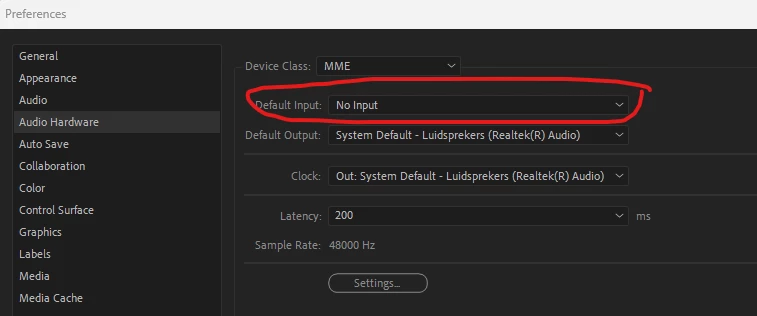
Hi @afonso_3680 - Please see the comment by Sumeet and check your audio hardware settings and make sure Default Input is set to "No Input"

Let us know if this helps.

Translate
theok8577996
theok8577996Correct answer
Inspiring
Jan 8, 2025 4:20 PM UTC


Translate
theok8577996
Inspiring
Jan 8, 2025 4:04 PM UTC

try setting audio input with prefs>audiohardware to none.

Translate
Adobe Employee
Jan 8, 2025 4:17 PM UTC

Hi afonso_3680,


Sorry to hear about this. Is this happening with any specific media or all of them? Please share a screenshot of the Audio Hardware preferences window in Premiere Pro.


Thanks,

Sumeet

Translate