harryd10549169
Participating Frequently
November 3, 2018
Question

Mysterious black lines at bottom of HD footage

  • November 3, 2018
  • 6 replies
  • 4080 views

This is a strange issue and despite doing all the regular setting changes I can't fix it.

I have a 1080 HD project with various types of HD footage, a Canon 5D, a drone and a gopro. Recently I updated the project to a newer version of premier.

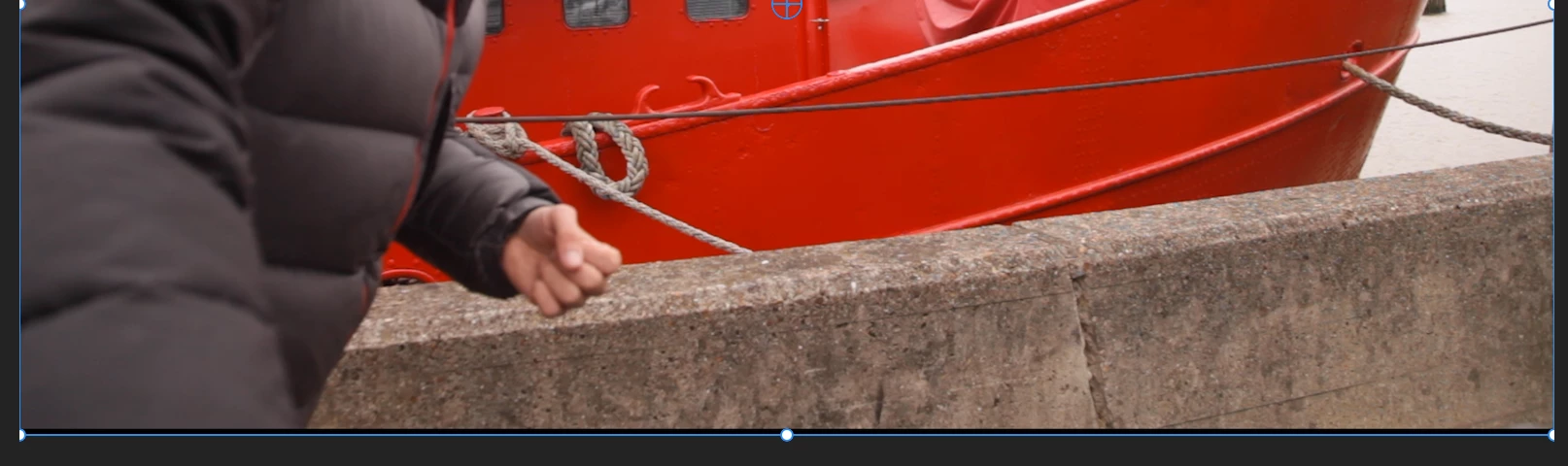
On doing this update the drone and gopro footage all fill the sequence frame but the 5D footage, whilst the clip settings fill the frame, is squashed up so that the bottom few lines of pixels inside the bounding box are black. When I review the clip outside of premier there are no lines at the bottom of the footage. I've checked and there are no pixels missing from the footage, more that the footage aspect ratio has been changed and black lines added to the bottom of the footage.

Here's a screengrab of the black lines at the bottom, including the bounding box.
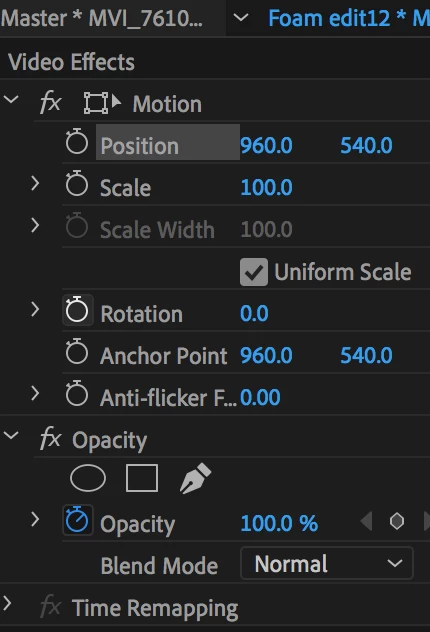
Here are the transform settings of this clip:
Here's how the gopro footage sits, no black lines.

Things i've tried in an attempt to fix this:

-- I opened this project on a brand new mac and still the problem persists.

-- I imported the footage (5D and gopro) onto a new mac and the problem was gone.

-- I've created a new project on my version of premier and the problem is still there.

-- The black lines are visible in the viewer as well as in the sequence so it seems not to be a sequence setting, but the way premier is treating it.

-- Unlinking and relinking the media

-- re-rendering

-- Lines appear on export

If anyone has any ideas, this would be really helpful!
All the best,Harry

This topic has been closed for replies.

6 replies

harryd10549169
Participating Frequently
November 3, 2018

Yes, that's fixed it! Thanks Stan. So it is a bug. To fix the problem all you have to do is switch off Hardware acceleration (in Preferences > Media), restart Premier and the lines are gone! It's worked for me. Potentially I could keep the hardware acceleration switched on and just switch it off when I need to export, since editing seems a bit slower with it switched off.

Also, I only encountered the problem after updating my operating system, which makes sense, as they say in the fix:

Note that the hardware acceleration option is only available on macOS 10.13 and later.

Participating Frequently
October 5, 2020

Thank you so much, this was driving me MAD, but this fix worked for me too. Crazy that this bug isn't fixed nearly 2 years later, though.

harryd10549169
Participating Frequently
November 3, 2018

Ahh sorry, that was an exported clip. Here is an original shot from the rushes...

Dropbox - Premier Rushes - Simplify your life

Stan Jones
Community Expert
Community Expert
November 3, 2018

Looks like a bug. See this post from Tim Kurkoski in AE Forum.

Re: black bar appeared on composition and footage – bug in cc2019?

You noted the Canon, and you must be on a Mac? He describes a workaround for now...

Ann Bens
Community Expert
Community Expert
November 3, 2018

How come I see it in vlc and potplayer on windows.

harryd10549169
Participating Frequently
November 3, 2018
Ann Bens
Community Expert
Community Expert
November 3, 2018

I tested it in 2019, 2018, cs6, AE 2019, vlc and potplayer and they all show the black line....

harryd10549169
Participating Frequently
November 3, 2018

Yes, it's only at the bottom. Here's an export:

Ann Bens
Community Expert
Community Expert
November 3, 2018

No i would like an original.

Upload to dropbox or simular.

harryd10549169
Participating Frequently
November 3, 2018

Thanks Ann,
To make the problem clearer i've overlaid the gopro (that's sitting correctly) on the right here.

Ann Bens
Community Expert
Community Expert
November 3, 2018

Yeah now its clear to see.

Is this only at the bottom or also at the top?

Can you upload a short clip to test?

Ann Bens
Community Expert
Community Expert
November 3, 2018

There is no black line on your footage: it means the footage is larger then the HD frame.

The blue line represents the edge of your footage not the frame.