Participant
August 23, 2021
Answered

Nach "schließen" ist der Inhalt der Schnittfensters weg

  • August 23, 2021
  • 1 reply
  • 2716 views

Hallo 🙂

Ich habe in Premiere Pro CC ganz normal ein Projekt erstellt.

Die Leiste mit den Aufnahmen im Schnittfenster war ganz normal.
In den Medien an der Seite hat es jedoch keine der üblichen Sequenzen angezeigt, die dann die benutzte Datei nochmals mit einem kleinen blauen Kästchen anzeigt.


Das war an sich kein Problem. Jetzt habe ich jedoch aus Versehen auf schließen und nicht auf speichern gedrückt.
Alles was ich zusammen geschnitten hatte, ist weg.
Ich finde auch keine Sequenz, wie es hier manche schon schreiben. Ebenso ist der Arbeitsbereich zurück gesetzt worden. Immer noch ncihts. Auch eine ältere Version der Datei zeigt die timeline leer an, wenn ich sie öffne.
Ich hoffe mir kann jemand helfen. 
Die Datei an sich wurde ja gespeichert und kann nicht einfach weg sein. 
Vielen Dnak vorab.


Liebe Grüße,
Hanna

This topic has been closed for replies.
Correct answer Averdahl
quote

I obviously accidentally triggered the command + W command in the timeline and then all my previously edited cinematic was gone!


By @peterk52120336


The only thing Ctrl+W/Command+W do is to close the active panel. It does not delete anything, never.


To find the sequence you closed with Ctrl+W:

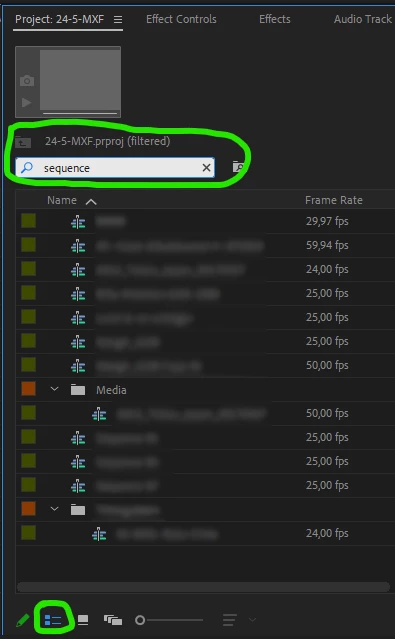
Go to your Project panel and click on the List View icon. Then write the word sequence in the search field in the Project panel. This will filter out all your sequences/timelines you have in your project. You will find the sequence you just closed among the ones you find.


Setting the Project panel to List view makes it easier to see, IMHO.


I don´t know if the german version requires you to write sequenze or how it is spelled in german. You will have to find out how it is spelled if the word sequence wont find any sequences at all. 


1 reply

Participant
September 8, 2024

Hallo, ich habe das gleiche Problem wie Hannah oben beschrieben hat. Ich habe im Schnittfenster offensichtlich versehentlich den Befehl command + W ausgelöst und dann war meine gesamte bisher zusammengeschnittene Filmsequenz weg! Selbst in der letzten Speicherung, wenn ich diese öffne, ist mein bisheriger Fortschritt weg. Ich habe in anderen Beiträgen im Internet gelesen, dass man im Projektfenster die entsprechende Sequenz noch einmal mit Doppelklick Anklicken soll und dann würde diese im Schnittfenster wieder da sein. Das hat bei mir nicht funktioniert, insbesondere habe ich einfach in meinem bisherigen Fortschritte sehr sehr viele Sequenzen verarbeitet, Ich war bereits bei einem circa 8 Minuten Film, den ich mit viel Aufwand zusammengesetzt habe. Kann jemand helfen? Vielen Dank im Voraus! Peter

Averdahl
Community Expert
AverdahlCommunity ExpertCorrect answer
Community Expert
September 8, 2024
quote

I obviously accidentally triggered the command + W command in the timeline and then all my previously edited cinematic was gone!


By @peterk52120336


The only thing Ctrl+W/Command+W do is to close the active panel. It does not delete anything, never.


To find the sequence you closed with Ctrl+W:

Go to your Project panel and click on the List View icon. Then write the word sequence in the search field in the Project panel. This will filter out all your sequences/timelines you have in your project. You will find the sequence you just closed among the ones you find.


Setting the Project panel to List view makes it easier to see, IMHO.


I don´t know if the german version requires you to write sequenze or how it is spelled in german. You will have to find out how it is spelled if the word sequence wont find any sequences at all. 


Participant
September 8, 2024

Thanks a lot, this has helped! The sequence was schon in the list at the bottom. In German I had to search for "Sequenz". Thank you, I thought it was all gone..