
Participating Frequently
September 24, 2024
Question

Necesito ayuda en un error

  • September 24, 2024
  • 2 replies
  • 999 views

Tengo un problema con el programa premier pro, el problema es que cuando se abren los ajustes de secuencia y los tengo ya configurados, no me deja desplazarme hacia abajo para poder aceptar y que se guarden los ajustes. Agradeceria si alguien sabe del problema y me pueda brindar una solucion.
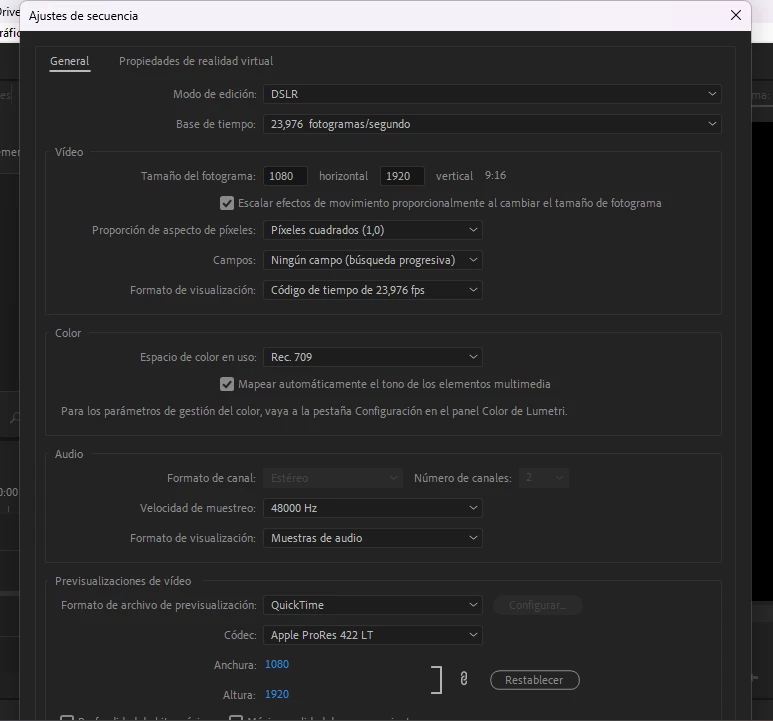
This topic has been closed for replies.

2 replies

Peru Bob
Community Expert
Community Expert
September 25, 2024

Try changing the display resolution of your monitor.


What are your computer and monitor specifications?

IanB_360
Community Manager
Community Manager
September 25, 2024

This is an excellent trouble shooting idea, but from the screen shot provided by brayan_5027

in the original post it is  the Sequence settings panel and not the New Sequence panel. Please let us know brayan_5027

if you can not see the options to Save presets  in the New Sequence Panel and then try to adjust your screen resolution. 

Ian

IanB_360
Community Manager
Community Manager
September 24, 2024

Which Version of Premiere Pro are you currently using? There is a way to save the preset for your sequences. I have included screen shots of the tabs and processes to access the SAVE PRESET option. But this only will apply to newly created sequences. You can not use a clip to make a new sequence and then switch the sequence settings to a different preset. To work around that just make a new sequence and then drop footage into a new sequence. 

Participating Frequently
September 24, 2024
Thank you bro for your response, in the third image you sent me you see "Save Preset" and finally "Cancel" and "OK"
These options do not appear to me because that window does not allow me to scroll down, that is the problem I have bro.