
Participant
March 14, 2024
Question

need help export format

  • March 14, 2024
  • 3 replies
  • 209 views

can you please help me with this export format
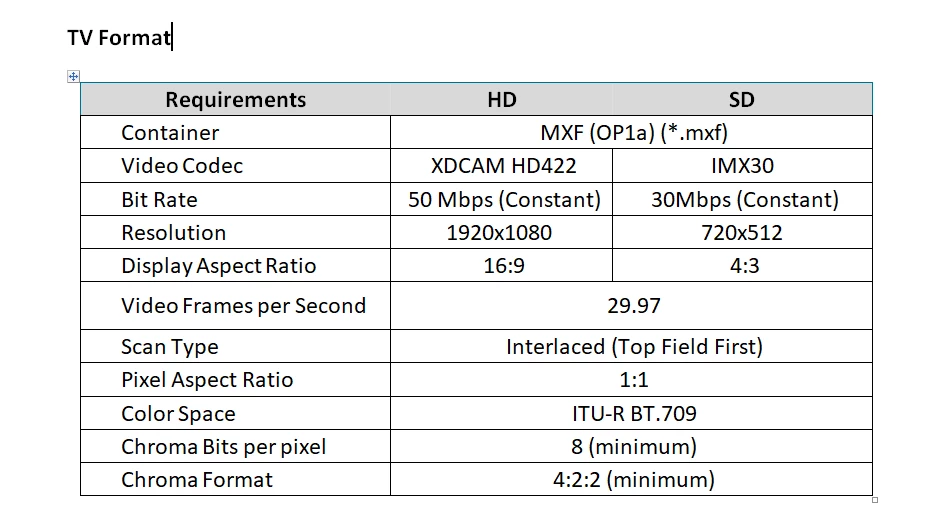
Can you help me with the format of this export, because this is the format they requested but some specs in the required format are not working or not being selected. Is there a workaround for this export format that is almost the same as the specs?

This topic has been closed for replies.

3 replies

Warren Heaton
Community Expert
Community Expert
March 14, 2024

Use the XDCAM HD422 1080i30 Sequence preset (New Sequence > Sequence Presets > Legacy > XDCAM HD422 > XDCAM HD422 1080i30).


When ready to export, the "XDCAM HD 50 NTSC 60i" preset matches these settings.  The "50" indicates the bit rate.


While in Export mode, click on the "..." ellipsis for "More presets..." 


Be sure to click on the star to set it as a Favorite.  As a Favorite, it will be available under Favorites in the Preset pop-up menu and also be available under Quick Export.


The IMX30 settings appear to be custom settings.  I would have expected 486i29.97.  I'm thinking create a duplicate of the XDCAM HD 50 NTSC 60i Sequence and then going into the Sequence Settings and customizing the options to match.


I'd export to MXF using ProRes 422 HQ and see if it can be transcoded to IMX with another application or delivered as 512i29.97 Top Field ProRes 422 HQ instead of IMX.


Ann Bens
Community Expert
Community Expert
March 14, 2024

Which specs are not available?

Might need to export to Prores and use something like Shutter Encoder to get the proper parameters.

R Neil Haugen
Legend
March 14, 2024

@Warren Heaton10841144  ... suggestions?

Everyone's mileage always varies ...