
Participant
August 15, 2023
Answered

Need help: Unable to Link Audio Video Clips in Premiere Pro

  • August 15, 2023
  • 3 replies
  • 5426 views

Hello, I'm encountering an issue in Adobe Premiere Pro where I'm unable to link audio to my video clips. I've tried multiple troubleshooting steps including verifying audio formats, reimporting files, and checking preferences. Despite these efforts, the 'Link Media' button remains greyed out and I can't hear any audio. Could you please provide guidance on how to resolve this issue?


My platform version is Microsoft Windows version 22H2 (OS Built 22621.2134) And I have Windows 11


My version of The App is 23.6.0 (Build 65)
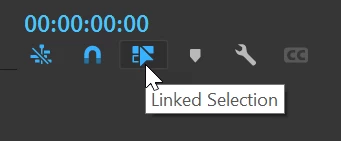
Correct answer Ann Bens

Wild guess:

3 replies

Ann Bens
Community Expert
Ann BensCommunity ExpertCorrect answer
Community Expert
August 15, 2023

Wild guess:

Inspiring
September 7, 2023

Thanks Ann... didn't even notice that little tidbit. Not sure why my footage has not been imported linked recently, but that fixed it. Appreciate it.

Participant
May 12, 2024

This worked for the first clip I tried, but when I went to the next clip, the Linked Selection was on, but the clip - and all others - remained unlinked.  Brand new Studio Mac with newly installed Premiere Pro 23.6.5

Peru Bob
Community Expert
Community Expert
August 15, 2023

Try resetting the preferences:
https://community.adobe.com/t5/premiere-pro/faq-how-to-reset-trash-preferences-in-premiere-pro/td-p/8236158?page=1

If that doesn't work, try resetting the Workspaces:
Reset a workspace
Reset the current workspace to return to its original, saved layout of panels.
1. Do one of the following:
• Click the Workspace menu icon and select Reset to Saved Layout.
• Choose Window > Workspace > Reset to Saved Layout.
from here:
https://helpx.adobe.com/premiere-pro/using/workspaces.html

If that doesn't work, try Preferences > Audio Hardware and set Input to None.

If that doesn’t work, try updating or rolling back your graphics driver directly from the video card manufacturer’s site. If NVIDIA, do a clean installation of the latest Studio Driver (NOT the Game Driver)

If that doesn't work, try creating a new project and import the old one into it.

Ann Bens
Community Expert
Community Expert
August 15, 2023

Screenshots would help.