Participant
May 11, 2020
Answered

Need to export audio with a still image for YouTube

  • May 11, 2020
  • 1 reply
  • 708 views

I have to now regularly upload to YouTube our monthly meetings which are audio. I know YT needs a still but I struggle with getting the file size to a reasonable level. I have a basic jpeg and the audio. The audio doesn't need to be crazy quality as it's basically a record of the meeting and everyone is on phones. The average audio length is around 2hrs. 


I've not had to do this before so can anyone kindly share the best settings to export audio with a still image for YouTube? Really appreciate your help. 🙂
This topic has been closed for replies.
Correct answer Averdahl

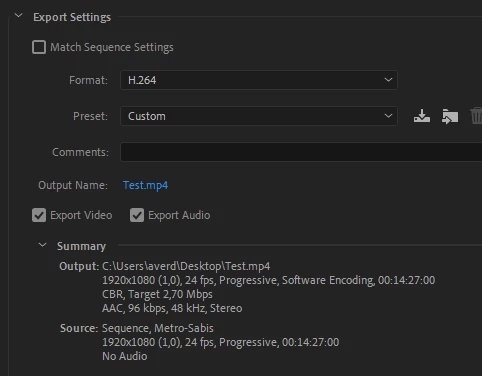
For the still you can get away with a bitrate of 2.7. For the audio i would opt for 96 kbps.


Do test exports of let´s say 10 seconds and try different bitrates for the audio and try to lower it until the audio quality is compromised too much. Mind you that YouTube will re-compress the audio when you upload it, so it may sound ok when you export it but sound worse when uploaded. Trial and error! 😉


1 reply

Averdahl
Community Expert
AverdahlCommunity ExpertCorrect answer
Community Expert
May 11, 2020

For the still you can get away with a bitrate of 2.7. For the audio i would opt for 96 kbps.


Do test exports of let´s say 10 seconds and try different bitrates for the audio and try to lower it until the audio quality is compromised too much. Mind you that YouTube will re-compress the audio when you upload it, so it may sound ok when you export it but sound worse when uploaded. Trial and error! 😉


Participant
May 18, 2020

Thank you so much! I'm going to test this out for some of the audio from last month so i can hopefully nail it right for the meeting in 2 weeks. Great solution so thank you SO much! : 😀