Participant
August 24, 2017
Answered

Need to fix iPhone footage so its not out of sync when importing in adobe premiere

  • August 24, 2017
  • 1 reply
  • 532 views

Have read a lot of comments on this. is there a simple step by step for this, rather then just explanations in vernacular speech.

I was suggested to fix your video in quicktime. But how? 
    This topic has been closed for replies.
    Correct answer gerikp

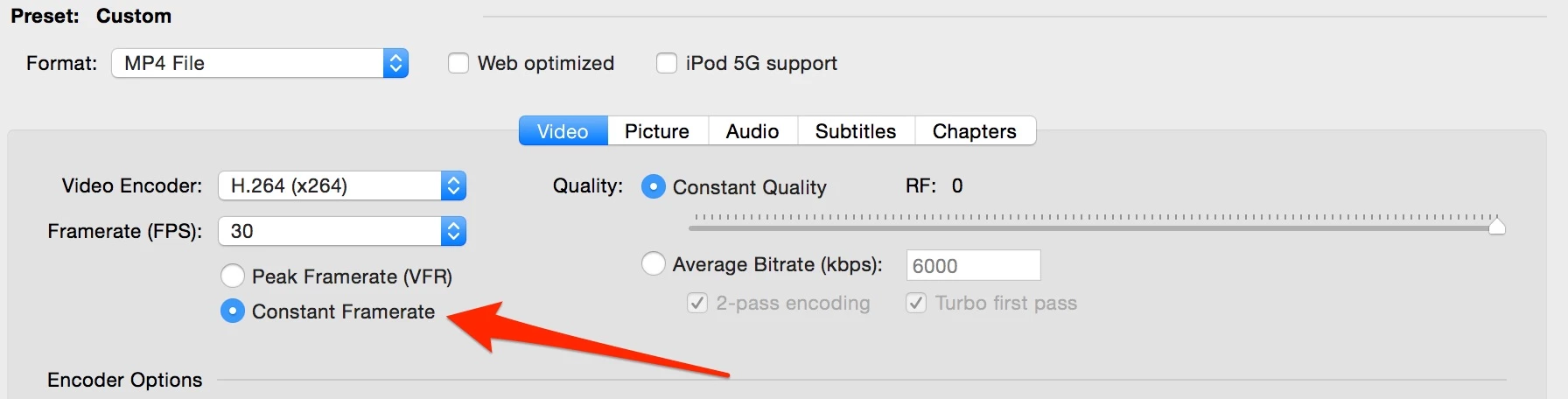
    I use Handbrake to convert footage from my iPhone. There's a selection you can click for Constant Frame rate.

    1 reply

    gerikp
    Community Expert
    gerikpCommunity ExpertCorrect answer
    Community Expert
    August 24, 2017

    I use Handbrake to convert footage from my iPhone. There's a selection you can click for Constant Frame rate.

    Participant
    August 24, 2017

    awesome. thx for the screen shot

    Participant
    August 24, 2017

    my security preferences alerted me not to download