Juan Barrilete
Inspiring
October 6, 2019
Answered

Need to repeatedly re-render clips that have Warp Stabilizer applied

  • October 6, 2019
  • 9 replies
  • 2721 views

I find that every so often Pr makes me re-render clips that I have previously rendered even though I have not modified the clip in any way. It happens intermittently and is not reproducible but every so often I'll start up the UI and see those red lines above the same clips. It seems to only happen to clips that have had Warp Stabilizer applied (and yes, I did re-render after applying WS). Has anyone else seen something similar?
    This topic has been closed for replies.
    Correct answer Juan Barrilete

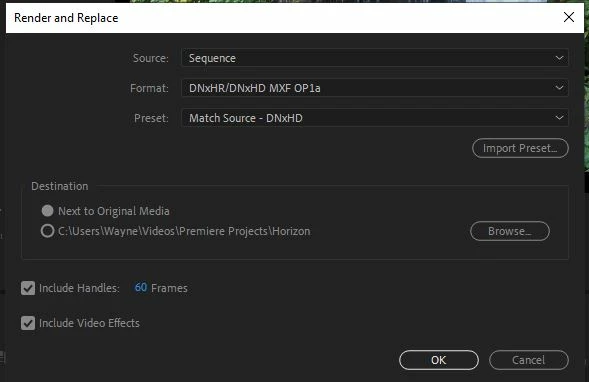
    Okay, I narrowed it down even further. The root cause is checking the "Include video effects" checkbox (in the lower left corner) when doing the Render/Replace:


    When its checked, I get the bug - when it's not, it goes through fine. It appears that checking the checkbox is sufficient to cause the bug - I removed the adjustment layer with the effect in the final test:

    9 replies

    R Neil Haugen
    Legend
    October 8, 2019

    As Ann says, justvapply Warp and after you like the settings, R&R the clip.


    Then you have a swet playing actual media clip *without* the heavy overload of Warp anymore. Now go do whatever else you want.


    Neil

    Everyone's mileage always varies ...
    Ann Bens
    Community Expert
    Community Expert
    October 8, 2019

    I think you have found the cause.

    Dont check Include Video Effects.

    Just add it to the render and replace clip.


    Juan Barrilete
    Inspiring
    December 21, 2019

    Thanks! For some reason I was not notified of this response (or Neil's) so am only seeing it now. There was a reason I needed to include the video effects for the Render/Replace - the artifacts I was seeing in the unrendered clip were related to some combination of effects. Unfortunately, I don't have a reproducible test case any more. What would be good is to be able to do the R/R more than once on the same clip - first on the Warp Stabilized clip without the effects, then including the effects. I suppose I could manually export after the first R/R but that's not the greatest user experience.

    R Neil Haugen
    Legend
    December 21, 2019

    The "movie" industry constantly renders replacement media during effects heavy bits. Even with monster machines.


    So it's really a normal part of effects work for a lot of editors/Fx people.


    Neil

    Everyone's mileage always varies ...
    Juan Barrilete
    Inspiring
    October 8, 2019

    Ann, Neil, any response? Can you at least try and reproduce my test case?

    Juan Barrilete
    Juan BarrileteAuthorCorrect answer
    Inspiring
    October 7, 2019

    Okay, I narrowed it down even further. The root cause is checking the "Include video effects" checkbox (in the lower left corner) when doing the Render/Replace:


    When its checked, I get the bug - when it's not, it goes through fine. It appears that checking the checkbox is sufficient to cause the bug - I removed the adjustment layer with the effect in the final test:

    Juan Barrilete
    Inspiring
    October 7, 2019

    Ann, this happens in the absence of any other clip in the timeline. I have pared down this to a reproducible test case.


    Ann Bens
    Community Expert
    Community Expert
    October 7, 2019

    Please post the rest of the timeline so we have a bigger picture.

    As soon as you change something to a clip WS needs to re-analyze.


    R Neil Haugen
    Legend
    October 6, 2019

    Warp was built as a last-ditch method to save the occasional file. And it works well enough that a lot of people use it for vast stretches and numbers of clips, which is a bit past what it was designed for. It's a massive resource user. So it is simply Wise Practice to fix a clip with Warp and render/replace, and move on.


    Then you don't have to worry about whatever you want to do with that clip, it just all works. Without needing to re-analyze.


    Neil

    Everyone's mileage always varies ...
    Juan Barrilete
    Inspiring
    October 7, 2019

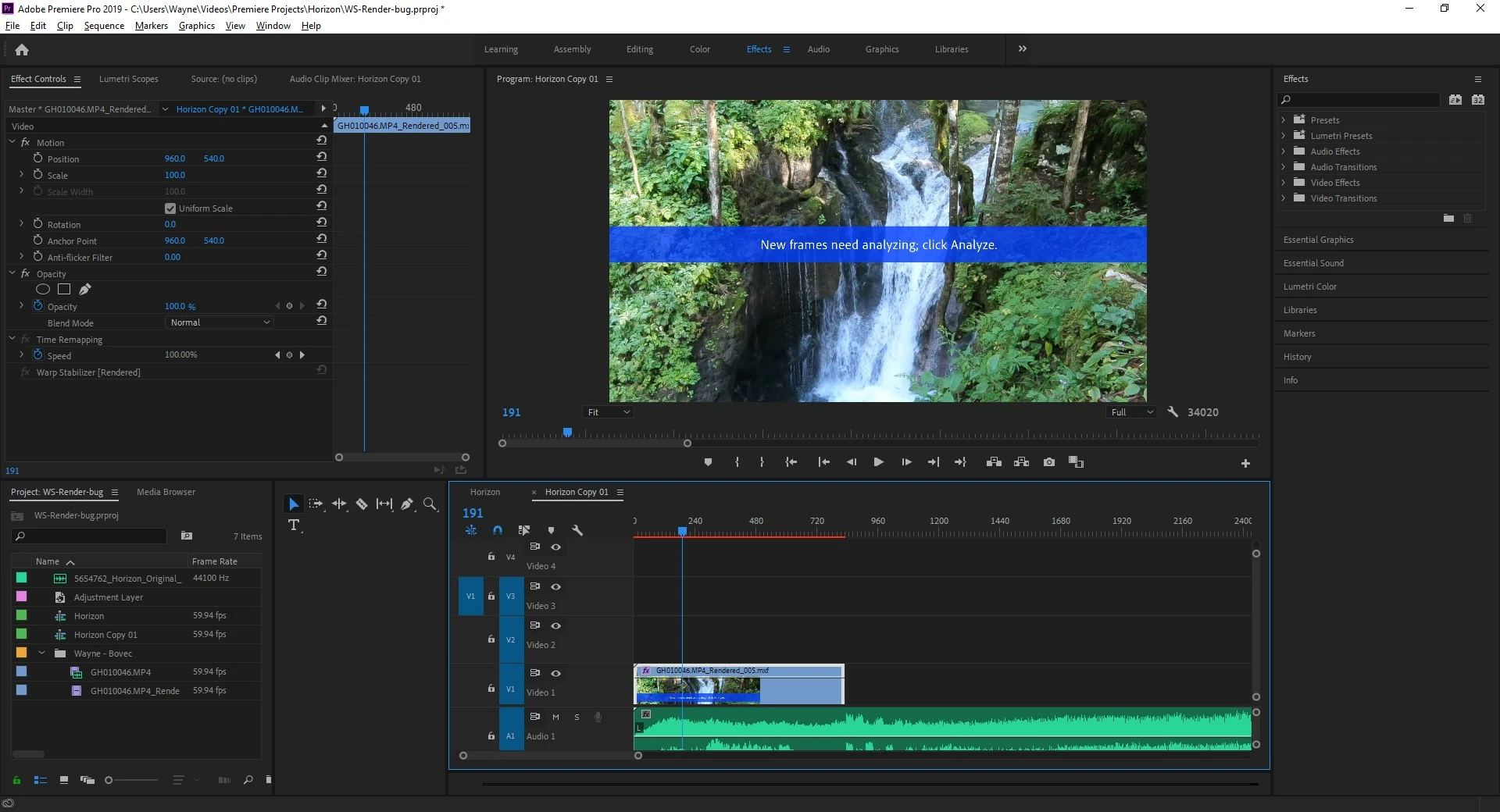
    This is strange. I tried what you suggested for one of my clips and got an MXF file with a big warning to "Click Analyze" but that's impossible because the Warp Stabilizer effect should be included in the rendered file. Here's a screenshot.

    As you can see there's no access to the Warp Stabilizer effect in the Effects Controls. I tried reverting to the original file and re-analyzing right before doing the Render/Replace but got the same result. How can I get past this?

    R Neil Haugen
    Legend
    October 6, 2019

    I don't do that much WS, but have always done any Warp work then rendered/replaced the clip on the timeline using Cineform or DNxHd/R, though now I typically use ProRes 422.


    Then I get good playback and no issues with reanalysis.


    Neil

    Everyone's mileage always varies ...
    Juan Barrilete
    Inspiring
    October 6, 2019

    Yeah, that render/replace is turning out to be a catch-all for several issues. I use it extensively for red/blue tint artifacts that show up at the end of many rendered clips. However, if there is a bug with the dirty flag on WS-applied clips, the Pr developers should investigate. It could point to other issues as well.

    Ann Bens
    Community Expert
    Community Expert
    October 6, 2019

    Please post your:
    Computer specs/setup,
    Operating system build,
    Premiere exact build (see about),
    Mediainfo screenshot in treeview of media used.

    Juan Barrilete
    Inspiring
    October 6, 2019

    Premiere Pro 13.1.5 (Build 47)
    Windows 10 Pro 64-bit desktop
    i7-8700 @3.2 GHz
    NVIDIA GTX 1080
    32 GB RAM
    2TB SSD

    All source clips and destination media are H.264