Answered
Nested sequences are automatically un-nesting
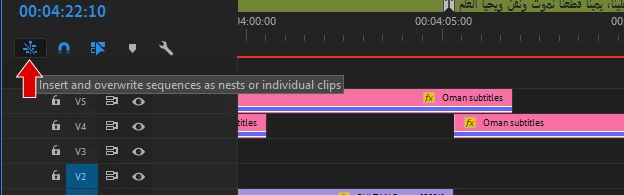
I work with nested sequences a lot, and now, all of a sudden, Premiere seems to be refusing to allow me to bring any sequences into the Timeline as nested sequences. Usually, I can drag sequences from the Project window to the Timeline and get a nested sequence in the Timeline, but now it won't "drop" into the Timeline. If I instead load a sequence into the Source window and try to edit it into the Timeline as a clip, the sequence automatically "unpacks" into individual clips when it comes in. This is true of Photoshop files I imported as layered sequences as well as normal video sequences created in Premiere. It's a weird and sudden behavior change and I cannot figure out why. Please help!
 AdChoices