


Oskars Adamovics
Inspiring
July 10, 2023
Answered

"NESTED" sequences not working properly

  • July 10, 2023
  • 3 replies
  • 837 views

So basically I was on vacation and when I returned my premiere was updated to 23.5.

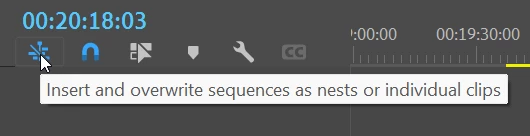
Before then I could drag some other sequence in my timeline as nested sequence but right now it just copies files in sequence as they are in that other sequence.


I read 23.5 update poster and there was nothing about changing sequences/nested sequences. This bug or "feature" makes daily editing life more harder cause now for example I can't create sequence in another resolution just to aply warp stabilizer and then implement it sequence with bigger resolution to scale it up (this is just an example).

 

Correct answer Ann Bens

You can turn auto update of in the CC desktop App.


3 replies

Stan Jones
Community Expert
Community Expert
July 11, 2023

> aftervacation syndrome


lol. I didn't know I was suffering that affliction. But it makes perfect sense!


Stan


Oskars Adamovics
Inspiring
July 11, 2023

My bad. If that option was there for years then I have forgot about it or it's just an aftervacation syndrome. 😄

Thank you.

Ann Bens
Community Expert
Ann BensCommunity ExpertCorrect answer
Community Expert
July 10, 2023

You can turn auto update of in the CC desktop App.