Participant
January 7, 2025
Answered

New Item Option MIssing

  • January 7, 2025
  • 1 reply
  • 726 views

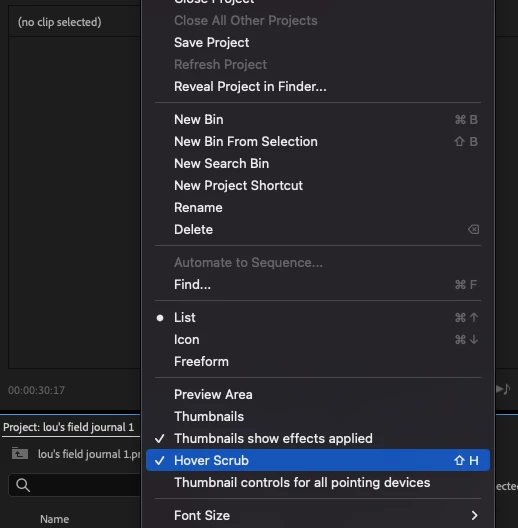
I've been trying to make a new adjustment layer for colour correction but i can't find the New Item button? would appreciate any advice. (for context this is on a Mac)

Correct answer ScottSimmons

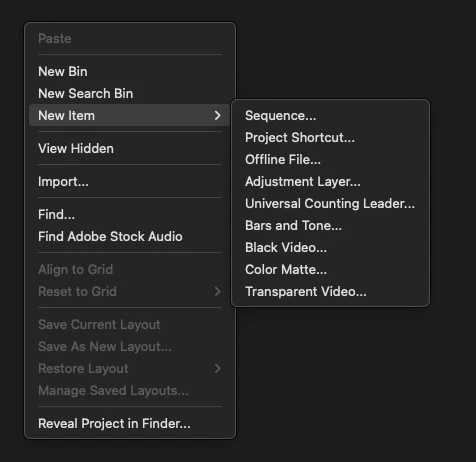
Right+click in a bin, new Item > Adjustment Layer. Or find it under the File menu.
 

1 reply

ScottSimmonsCommunity ExpertCorrect answer
Community Expert
January 7, 2025

Right+click in a bin, new Item > Adjustment Layer. Or find it under the File menu.


Kevin J. Monahan Jr.
Community Manager
Community Manager
January 7, 2025

Hi @louisa_9421,
I read your post. Welcome to the forum. Ask anything you like here!


It looks like you are clicking the panel menu at the top of the Project panel.


@ScottSimmons has it right.


Another place you will find the New Item button at the bottom right of the Project panel. It looks like a page with a bent corner.


If you don't see it, expand the panel a bit to the right. It might not be in view if you have a small monitor.


If the option to create a new Adjustment Layer is disabled in any menu, make sure the Project panel is selected. You will be able to create one then, for sure.


Let us know if the advice helped you. I apologize for any frustration you may have experienced. Take care.


Thanks,
Kevin


Kevin Monahan - Sr. Community and Engagement Strategist – Adobe Pro Video and Audio