Participant
May 13, 2017
Answered

new layer question

  • May 13, 2017
  • 2 replies
  • 253 views

What is the command where you can add a new layer like in FCP7 to your sequence?

I'm trying to add a layer of black, to then drop the opacity down to 50% to reveal text better.

    This topic has been closed for replies.
    Correct answer Meg The Dog

    Do you mean add a new video track to the timeline?

    There is no default key shortcut for this (but you can add one if you like).

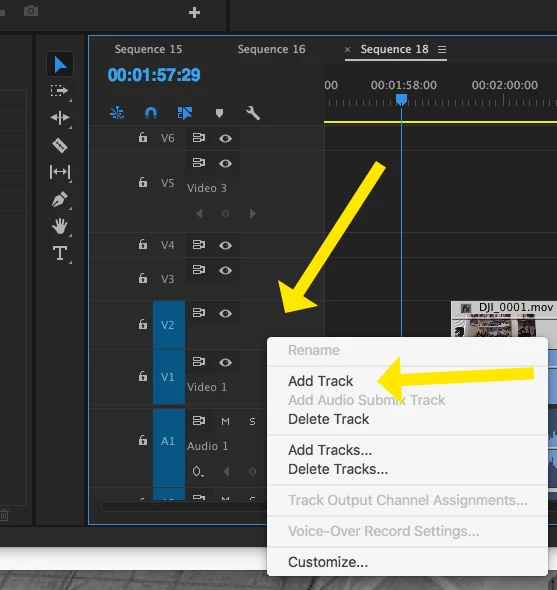
    Right click (Control click) on the space next to the track headers and from the drop down menu choose Add Track:
    To get a clip of black to place on the track, go to the menu File > New > Black Video . . .

    MtD

    2 replies

    Meg The DogCorrect answer
    Inspiring
    May 13, 2017

    Do you mean add a new video track to the timeline?

    There is no default key shortcut for this (but you can add one if you like).

    Right click (Control click) on the space next to the track headers and from the drop down menu choose Add Track:

    To get a clip of black to place on the track, go to the menu File > New > Black Video . . .

    MtD

    premieregal
    Community Expert
    Community Expert
    May 13, 2017

    Hi @apeltier1980 - Happy to help.

    1. Select the new item button from the lower right corner of the Project Panel.

    2. Select "Color Matte." You can pick "Black" as the color.

    3. Give your color matte a name if you like, such as "Black Matte"

    4. The color matte will appear in your project panel, then just drag and drop the color matte into your sequence.

    5. Select the color matte in the timeline and under "effects controls" drop the opacity down to 50%

    OR

    6. You can right click on the clip, select "Show Clip Keyframes" and turn Opacity on.

    7. Then you will be able to move a small white bar up or down to adjust the opacity level.