
Participant
November 3, 2016
Question

New sequence window too big for my computer screen??

  • November 3, 2016
  • 5 replies
  • 12336 views

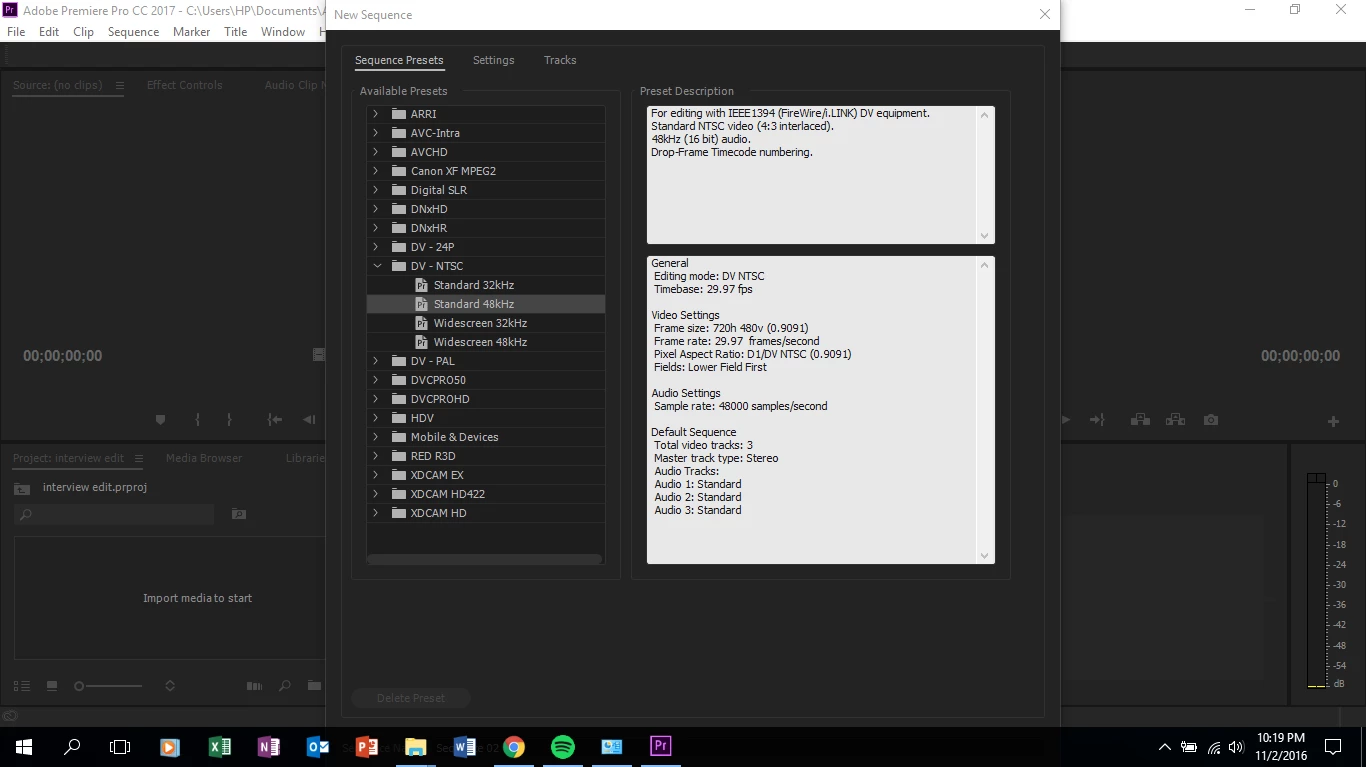
Please help! I brought and downloaded premiere pro 2017 today. I'm not able to do anything in it though because the new sequence window is too big and I am unable to make it smaller or move it up more so I am unable to click the submit button at the bottom.

I even updated to windows 10 because I heard it would help. My screen resolution is 1366 x 768 and its displayed at 100%.

What should I do?
This topic has been closed for replies.

5 replies

Participant
December 8, 2019

Please help! I brought and downloaded premiere pro 2017 today. I'm not able to do anything in it though because the new sequence window is too big and I am unable to make it smaller or move it up more so I am unable to click the submit button at the bottom.

I even updated to windows 10 because I heard it would help. My screen resolution is 1366 x 768 and its displayed at 100%.

What should I do?

Participant
December 8, 2019
 

Please help! I brought and downloaded premiere pro 2017 today. I'm not able to do anything in it though because the new sequence window is too big and I am unable to make it smaller or move it up more so I am unable to click the submit button at the bottom.

I even updated to windows 10 because I heard it would help. My screen resolution is 1366 x 768 and its displayed at 100%.

What should I do?


timb85230387
Participant
April 17, 2017

Same issue here... I can locate the "OK" button, but I cannot click it to create a new sequence.  This is beyond frustrating, I also have an older version of premiere pro as an alternate in case of a bug or glitch... and when exporting with premiere pro cs6, I get "error compiling movie: error unknown"

I am so annoyed with Adobe. Any other ideas for a great editing software?

Legend
April 17, 2017

Those users having the display resolution issues may have no choice but to downgrade to a cheapo consumer editing software that likely does not perform the tasks one desires at all whatsoever (because the desired effects and rendering features in question are either missing or unsupported). Most other companies' professional-level editing software require even higher resolutions (for example, 1280x1024 minimum) than Adobe Premiere Pro just to work properly.

And when I got my current i5 laptop with a 1920x1080 screen, I initially had the same problem as the OP did until I realized that my display scaling in Windows was set to 125% by default (as purchased). That effectively reduced the display's resolution to 1536x864 instead of the desired 1920x1080. I also had to delete (reset) Premiere's preferences to restore the Premiere boxes back to "normal".

hasnain.sunny7
Participant
April 11, 2017

you should select your settings for new sequence and press enter. I have he same problem I am using Laptop

Participant
March 7, 2023

Oh my God this worked ! But what is you have to change your settings at some point ?

I'm using a laptop with 1366 x 768 settings, I have tried changing them but nothing would help.


Kevin J. Monahan Jr.
Community Manager
Community Manager
December 13, 2016

Hi Agong,

I even updated to windows 10 because I heard it would help. My screen resolution is 1366 x 768 and its displayed at 100%.

Your screen is below the system requirements, You need a screen resolution of 1280 x 800, minimum. You'll need to get a new computer screen.

Thanks,
Kevin

Kevin Monahan - Sr. Community and Engagement Strategist – Adobe Pro Video and Audio
kulpreet singh
Inspiring
November 3, 2016

Hi Agong,

My screen resolution is 1366 x 768 and its displayed at 100%.

That seems to be the issue.

Minimum requirements: 1280x800 display

Premiere Pro System Requirements for Mac OS and Windows

Thanks,

Kulpreet Singh

andrewp41064395
Participant
November 15, 2016

I have the same issue, and it doesn't seem to matter what my resolution is at, the screen is still too big