
Participant
March 3, 2026
Question

New Stroke Effect don't apply on the outline

  • March 3, 2026
  • 3 replies
  • 35 views

Hello !


The new Stroke effect (from film impact) is great but don’t work as it should (at least in my opinion)
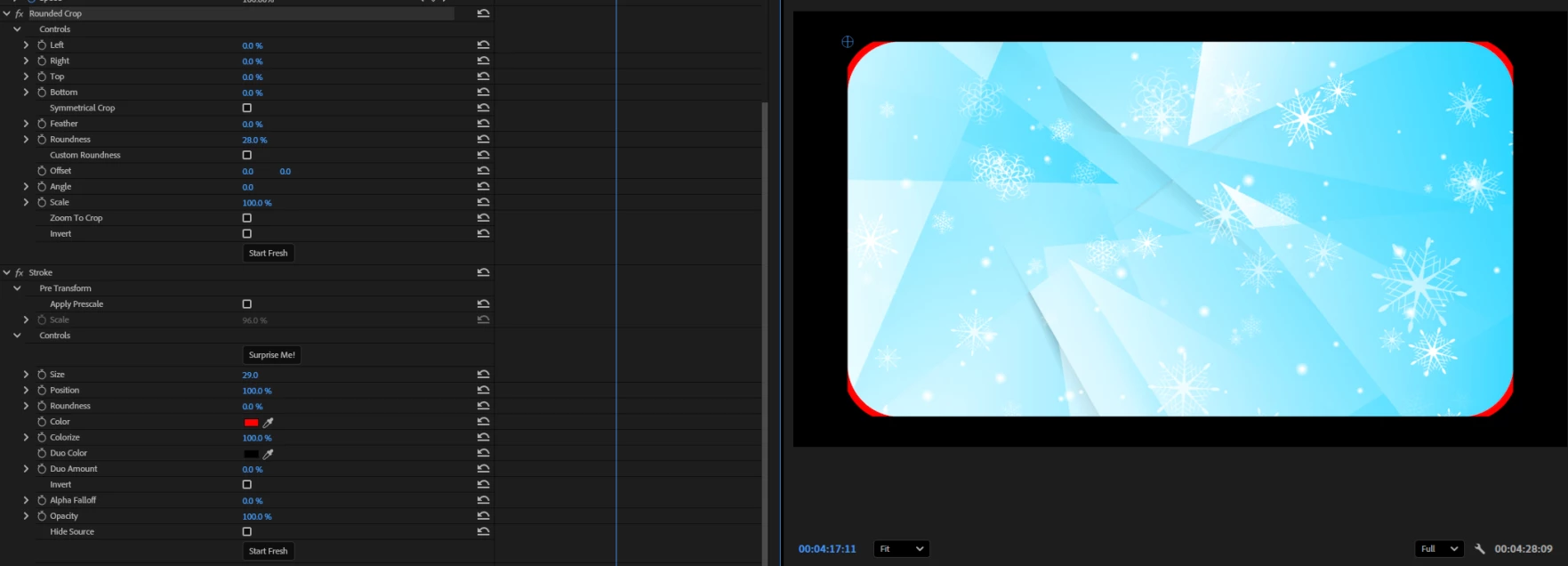
It seems that without that pre-scale settings, the stroke don’t appear (unless your crop, see in red, the rounded crop). It’s not really easy to manage, i need to adjust the prescale and border size each time to have something clean, and even with that, it’s often not perfect.

Why it’s not just an outline of the current size, like the drop shadow, a outline adding ? Would be cool if it can be in this way.

Thanks !


3 replies

ThioJoe
Community Expert
Community Expert
March 3, 2026

Yea I have to agree. It does not feel like a native effect.


The need to do a pre-transform really throws a wrench in the usefulness of it, especially if I’m applying the effect to stuff I’ve already placed and sized how I want.


I understand that it came from the Film Impact suite of effects which were third party. And maybe they’re planning on improving it. But in the end it really should just work like it does for adding a drop shadow for example. The “pre-scaling” requirement should not even be a thing.

Many of the other effects seem to have a similar problem where the effect is restricted to the bounds of the original object, like the Wiggle effect for example. Needing to do pre scaling truly feels like a janky workaround. It’s probably a limitation in whatever SDK they used to make the effects. Hopefully now that Adobe purchased them, they can make them work more like native effects.

Ann Bens
Community Expert
Community Expert
March 3, 2026

You need to apply Prescale (inside the stroke effect) to make the stroke visible.

Participant
March 3, 2026

Yhea, that what i’m saying.

But it’s not intuitive at all.
I don’t want to have to calculate 8 time what is the right Pre-scale ratio/border/media size to have something i want. I just want a simple outline that follow where my media is, at the same size it is.
So in the same way of the Drop Shadow effect (or any effect that affect the ouline of a media).

Ann Bens
Community Expert
Community Expert
March 3, 2026

Then use the blue guides as a template or make mogrt.

Prescale does exactly the same scaling as Scale in Motion.

Ann Bens
Community Expert
Community Expert
March 3, 2026

Please show the effect controls > Motion