jameskbuck
Participating Frequently
August 27, 2017
Question

New title tool off center in square sequence?

  • August 27, 2017
  • 6 replies
  • 1819 views

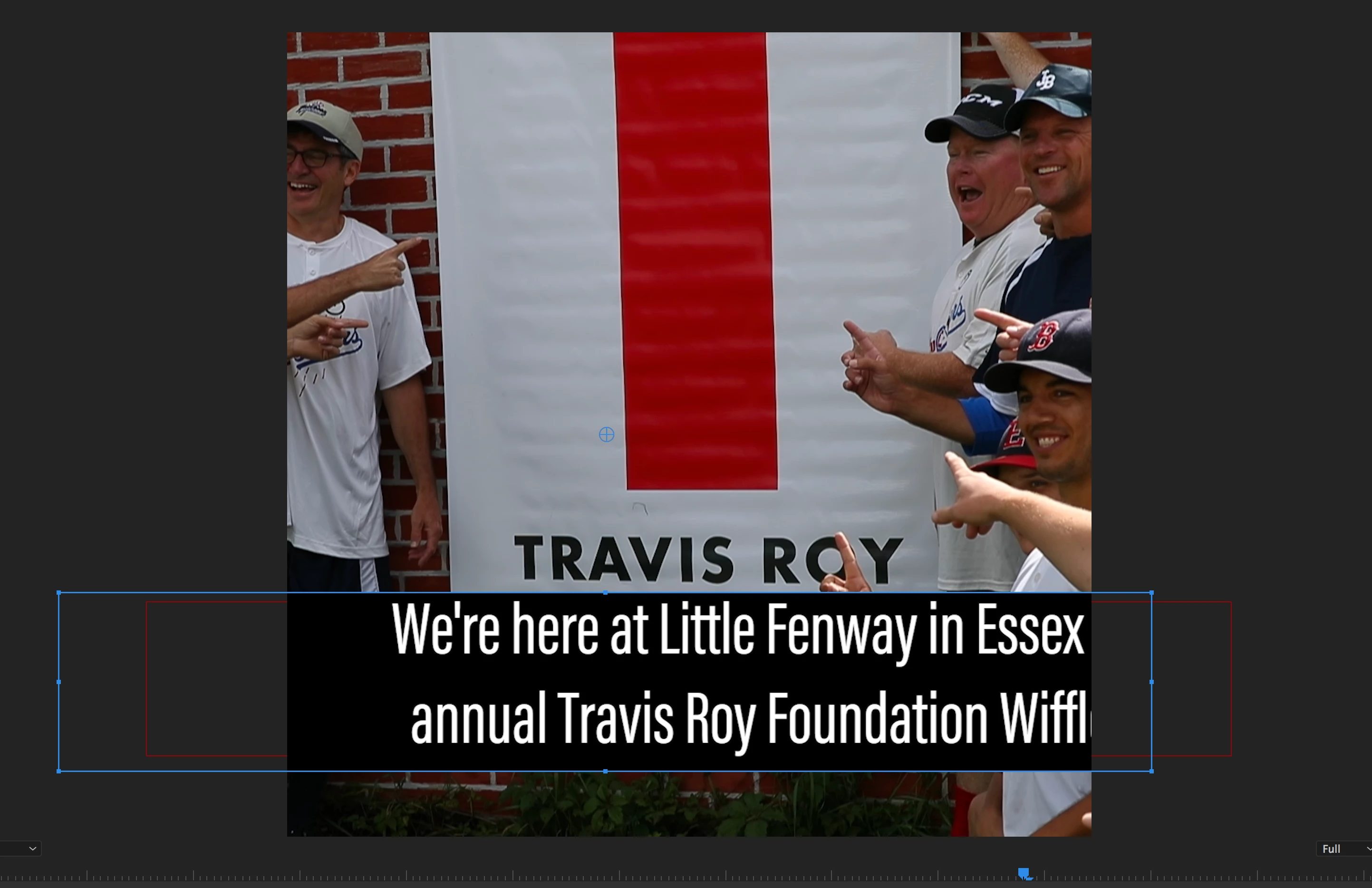
Hi, with the new title tool, when moving content to (or changing sequence settings to) a square sequence, i.e. when making an Instagram cut, the titles are off-center from their enclosing box, and can't be re-centered. Note: I am not talking about text alignment (left/center/right), I'm talking about the text relative to the text area.

With the old title tool when resizing the text it stayed centered. Now the text is outside the text box and it's very hard to control. Help?
This topic has been closed for replies.

6 replies

MaryHarris
Participant
October 19, 2017

Hey, I've happened to be newbie here but I like your posts, and I hope one day I'll post my own thread

andrew_articom_sthlm
Participating Frequently
October 19, 2017

Would just update to say that Adobe Premiere CC Pro 2018 does not fix this issue -- at least not for projects created under the latest earlier version of Premiere Pro CC 2017.

The behaviour is different under the new functionality in 2018, but it doesn't solve the underlying problem of the text no longer confining itself to its box after a sequence is resized.

//A

andrew_articom_sthlm
Participating Frequently
October 17, 2017

Hi again,

I made a pair of dead clear screen shots that I was going to attach to my bug report, but there was nowhere to attach them. In any case, this is what we're up against. While I wouldn't have expected the text to fit into the new, square sequence, I would have expected the text to remain inside of its bounding box.

I was going to delete them for my desktop, but thought Adobe might take this thread more seriously with a little additional documentation.

//Andrew

andrew_articom_sthlm
Participating Frequently
October 10, 2017

Hello,

Just wanted to take the chance to thank you all for the workaround suggestion. That's the closest thing I've seen to a solution to this problem.

I also agree that this has to be a bug. There's no way that the correct behaviour, considering the texts don't respect the relationships to their containing boxes at all. Has anyone reported this as a bug?

//Andrew

Inspiring
August 27, 2017

I'm not sure what or which workflow you are using to create the square version.

If I take a 1920 x 1080 sequence, duplicate it, and then working on the copy change the pixel dimension to 1080 x 1080 - I can replicate your problem.

If, however,  I create a new sequence and set the frame size to 1080 x 1080, make sure my Media Scaling preference is set to none, then drag in a 1920 x 1080 sequence that contains Essential Graphics - the graphics stay centered in the now square frame.

MtD

jameskbuck
Participating Frequently
August 28, 2017

Meg - the second instance you describe is I think what I'm doing, and the titles are off center. See screen vid:

Inspiring
August 28, 2017

Trying to post a demo but Vimeo running slow.

Basically what you are doing but instead of copying and pasting from the master sequence into the square sequence, instead drag the master sequence into the square sequence from the project panel as a nest.

The text and text box stays centered

When you want to make changes to the type, click back on to the master sequence tab in the timeline and make the changes there, the nest will update.

Ah - Vimeo finally processed the file:

MtD

premieregal
Community Expert
Community Expert
August 27, 2017

Hi James - Alas, I'm afraid, that when you create text in a 16 by 9 sequence (e.g. 1920 x 1080) it will keep those dimensions when you copy and paste them into a square sequence. It is best to recreate a new title tool within the new square sequence for it to be able to re-centered properly. I know it's a bit frustrating, especially if you are just adapted a 16 by 9 video to be square and have all the titles done. Have you tried manually resizing the scale and centering the text under the effects controls? 

I haven't found any workarounds as of yet. Anyone else?

jameskbuck
Participating Frequently
August 28, 2017

premieregal -

Resizing using effects controls creates this problem - moving the text moves it outside of its text box. Try it out.

This did not happen with the old text tool, and no, I'm not going to recreate the titles all over again when I duplicate a sequence for a different platform.