dancingbrook
Known Participant
January 25, 2021
Question

Newbie still; export or extract?

  • January 25, 2021
  • 3 replies
  • 449 views

Hi all, still learning...

I'm hoping to extract clips, both linked and just audio, as clips.

See attached image. In addition to the entire sequence as one video, I need to also have individual "tracks" (I come from Audition) so folks can view just the tracks they want.

Is there an easy, or most logical way to export these individual tracks/clips?
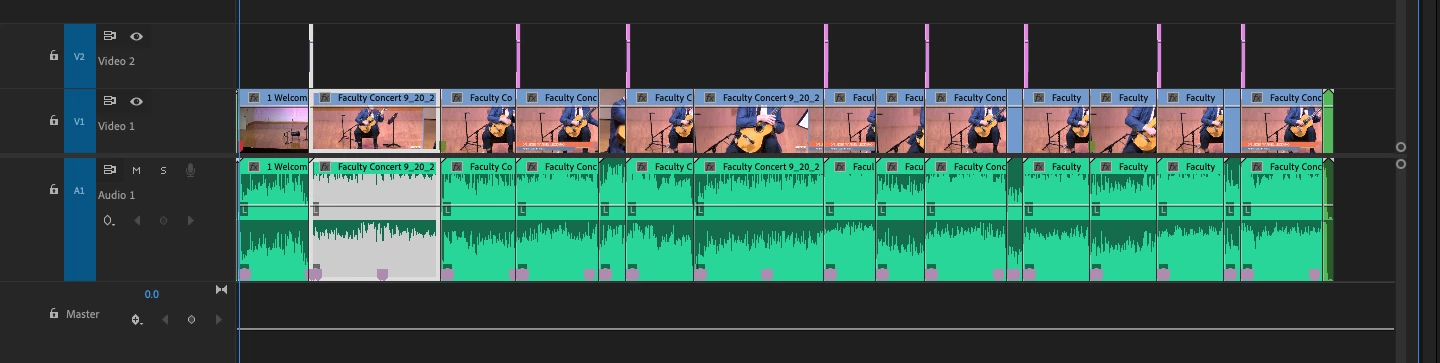


Any help gettimng me there more quickly (than my continued experimentation) would be appreciated.

This topic has been closed for replies.

3 replies

dancingbrook
Known Participant
January 25, 2021

OK, changing the export location prevented the error, but still don't get separate video clips, just separate audio.

dancingbrook
Known Participant
January 25, 2021

Seemed to be a disk ful error; why Adobe can't simply state that...???

🤷 

dancingbrook
Known Participant
January 25, 2021

OK, I just discovered, Edit > Edit in Adobe Audition > Sequence, will give me exactly what I need on the Audio/Audition side, a folder full of the individual audio tracks.

I still need (I hope) an easy way to export those complete video (with audio) clips, as separate individual clips.

dancingbrook
Known Participant
January 25, 2021

I hoped the video here on Exporting Individual Clips was what I needed, but I keep getting an unexplained error.

dancingbrook
Known Participant
January 25, 2021

Thanks John,


First thing I'll need to do is learn how to "Set IN and OUT on your timeline and then tell export to do so between the markers. 😉 

I think I'm already set with the IN and OUT, as my clips are as I want them to be for the full export.


Now trying to figure out how to "tell export to do so between the markers."


I've already viewed many tutorials and videos; the sheer volume is more than a bit overwhelming.