

No Audio after Exporting
I've made a video for my students who are not able to tour a building because of COVID. I used a Canon Powershot SX60 to record the video (and audio) and a mobile plus lavalier to record the audio. I started a New Project and accepted the defaults. I added four MP4 video files to the Project as well as the m4a from the mobile. One by one, I put the video file in the Source panel, trimmed what I wanted and dragged the video to the timeline in one track. For each video, I hunted down the matching audio in my m4a, using the in and out markers on the video's audio. I dragged each audio segment as a clip to the timeline in one track. I matched up the start points, applied simple fade transitions and played it back in the Program panel. It played exactly as I wanted and the audio levels were bouncing around the correct range.
Then, I File > Export > Media. I think I kept the defaults the first time around, except changing the file name. I did notice that the preview didn't show the whole sequence, but I think I just dragged the in/out markers in the preview to suit. I chose the format as H.264, which was suggested in a Help file in the school's site I am loading up to. That site also suggested "Android 720p" but I think the first time, I left it as "Match Source - High bitrate" in a rush. I eagerly clicked Export, and when the rendering was done in about 9min, the video had no audio. I have tried the actions below, but I still end up with an MP4 with no audio. Moreover, I have no audio in my Program panel, where it did play before.
I have tried to read as many help articles/discussion posts as time could afford, but the students are expecting this to get uploaded so they can do their work. I have tried....
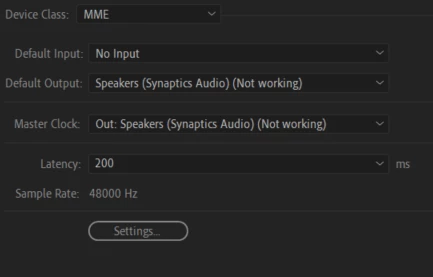
- changed Audio Hardware to different speakers (at times, it did say, "Not Working" after the dropdown item, but it does not now)
- I tried different presets in the Export: YouTube 720p, Vimeo 720p, Match Source - Low bitrate, Adobe Stock with video HD
- I set Device Class to "MME" and Default Input to "No Input"
- I added Bars and Tone to the timeline, and it did play the tone (and showed the bars)
- I toggled the Mute and Solo on the audio track during playback in the Program panel
- Ensured that each of the 4 audio clips in the timeline are Enabled
- "Export Audio" is enabled in the export settings
The following events/behviours might be clues:
- when I go to the Project panel, click on an video file, click on the tiny audio button and scroll, I do hear the audio;
- when I go to the Source panel and click the Play button, the audio plays for the video; switching to the audio file and clicking Play produces no sound, but the marker moves as expected;
- the Program panel produces no audio playback but the video plays;
- I did change audio devices while creating this because I was multitasking and needed to change to speakers and back to headphones for other apps.
Can't think of anything else at the moment. I feel that somehow I just need to re-attach/sync the audio file, but I'm afraid I'll lose the in/out markers, which was tedious to locate (i.e. took hours--I'm showing my low level of experience, but I learned how I would do it again. 🙂 ). Either that or my lack of understanding all the audio choices has stuffed things up.
Appreciate any insight.
(screen shots below -- thanks Ann Bens...didn't see the button)

 AdChoices