Participant
August 15, 2017
Answered

No Audio in Premiere

  • August 15, 2017
  • 3 replies
  • 466 views

Hey everyone,

When I make a sequence my first clip in there has a audio track. But the second track I want to drag in won't be accepted. I get the not allowed sign and when I try to drag both audio and video in Premiere will only apply the video track. I already emptied my cache folder but that didn't help at all. Hope there is a other solution, thanks.
This topic has been closed for replies.
Correct answer Enchanted_socialite16B7

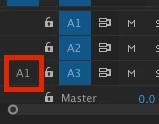
See how A1 on the 3rd audio track is not blue? The audio is not being imported because the audio source patch is not enabled. Click on A1 to enable it and try placing the clip in the Sequence again.

3 replies

Participant
August 15, 2017

Both are on. It happens when I drag both in the sequence and when I only drag the audio in. The second clip has audio, but when I put it in my sequence only the video wil appear and not the audio track.

Enchanted_socialite16B7
Inspiring
August 15, 2017

See how A1 on the 3rd audio track is not blue? The audio is not being imported because the audio source patch is not enabled. Click on A1 to enable it and try placing the clip in the Sequence again.

Ann Bens
Community Expert
Community Expert
August 15, 2017

Its all in the source patching:

Enchanted_socialite16B7
Inspiring
August 15, 2017

If I understood your problem correctly, it sounds like you have the source patch set on the video track, but not the audio track.

Make sure the source patch for both audio & video tracks are on.

With media opened in the Source Monitor or selected in the Project Panel, there should be a blue V1 icon on a video track and a blue A1 icon on an audio track. If there is no icon on the audio track, this could be your problem.

Try clicking to the left of the Track Lock icon in an audio track to enable source patching on that track. Then try placing the clip in your sequence. Patching source sequences in Premiere Pro

Hopefully this fixes your problem!