culture geneve
Participant
November 18, 2016
Answered

No Audio when video dragged into timeline adobe cc 2017.0.1 (11.0.1 (6))

  • November 18, 2016
  • 1 reply
  • 410 views

Hi,

Is there a quick fix to this or should i downgrade to the previous version of premiere?

Is the previous version less problematic?

thanks in advance as i need to move fast.
This topic has been closed for replies.
Correct answer Vidya Sagar

Hi Culture Geneve,

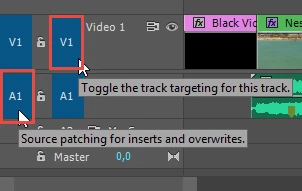
It might be an issue with Source patching. Make sure the source patching for Audio track is enabled.

Instructions: Patching source sequences in Premiere Pro

Please let us know the status.

Thanks,

Vidya Sagar.

1 reply

Vidya Sagar
Vidya SagarCorrect answer
Participating Frequently
November 18, 2016

Hi Culture Geneve,

It might be an issue with Source patching. Make sure the source patching for Audio track is enabled.

Instructions: Patching source sequences in Premiere Pro

Please let us know the status.

Thanks,

Vidya Sagar.

culture geneve
Participant
November 22, 2016

patching was correct.

Is there any way to add missing audio with a right click or something like that?

Is this not a bug in premiere?

I need to start a project very quickly and if premiere is buggy, please let me know, or if you are planning to fix this soon?

Ann Bens
Community Expert
Community Expert
November 22, 2016

No its not a bug it is an operators error.

Watch the video in the link Vidya gave you.