
Participant
December 20, 2024
Answered

No close option available on popup window Modify clip in pre

  • December 20, 2024
  • 3 replies
  • 899 views

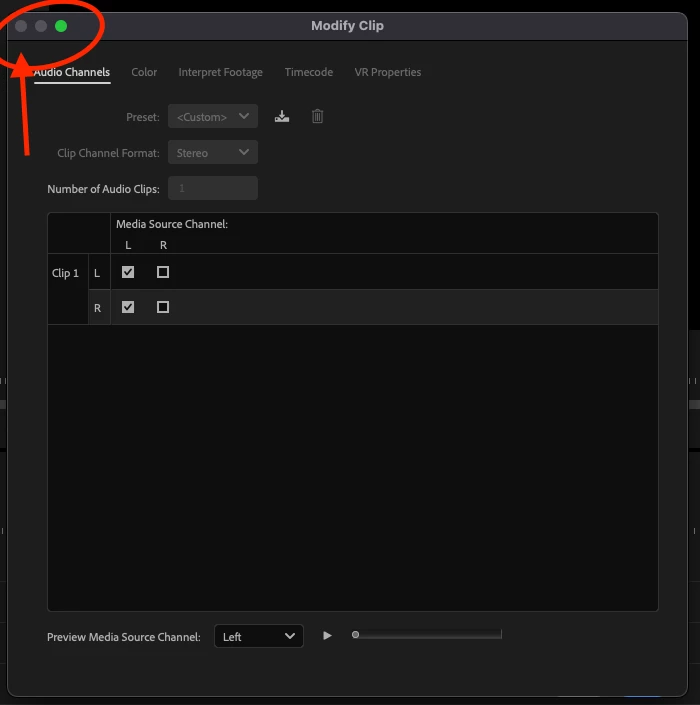
When I tried to modify the clip from the timeline or the project window, the popup window did not have a close option. I have to force quit the application. 
I am using a MacBook Air M1 Os Sequoia 15.1.1 (24B91). 
Premier pro V25.1
I tried multiple clips and different projects it's same in all
This topic has been closed for replies.
Correct answer Kevin J. Monahan Jr.

Hi @Lokesh292371512mjy,

Thanks for the message. Your issue might be "as designed," but I'd need confirmation from the team. To close the dialog box, you can click the cancel or OK button that appears off-screen in your screenshot. If you can't access these buttons, check the system requirements for display. Your computer monitor might be too small or too scaled up and that puts certain dialog boxes offscreen. I hope the advice helps. Thanks again for the question.


Cheers,
Kevin


3 replies

MyerPj
Community Expert
Community Expert
December 20, 2024

Yep, looks like your screen is too small. Either it's physically too small, or with OS scaling you've made it too small.

Participant
December 21, 2024

I am using this monitor from LG
https://www.amazon.in/dp/B0BRQVQJW2?ref=ppx_yo2ov_dt_b_fed_asin_title&th=1

I am encountering this after updating to v25.x. Earlier it was working fine
The Resolution is the default


Ann Bens
Community Expert
Community Expert
December 21, 2024


Participant
December 20, 2024

@Kevin-Monahan Thank you for the reply.

I got it, the cancel and ok buttons are not displaying on my wide-screen monitor. 

Kevin J. Monahan Jr.
Kevin J. Monahan Jr.Correct answer
Legend
December 20, 2024

Hi @Lokesh292371512mjy,

Thanks for the message. Your issue might be "as designed," but I'd need confirmation from the team. To close the dialog box, you can click the cancel or OK button that appears off-screen in your screenshot. If you can't access these buttons, check the system requirements for display. Your computer monitor might be too small or too scaled up and that puts certain dialog boxes offscreen. I hope the advice helps. Thanks again for the question.


Cheers,
Kevin


Kevin Monahan - Sr. Community and Engagement Strategist – Adobe Pro Video and Audio