sallyg11977468
Participant
June 5, 2017
Answered

No 'Embed in Output File' option for captions (Premiere Pro 14.9 and earlier).

  • June 5, 2017
  • 4 replies
  • 2783 views

Hi

When I go to export my video with captions, I don't seem to have the option to embed in output file?
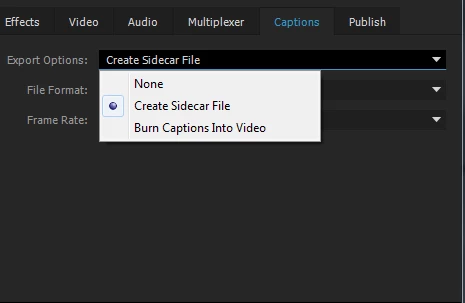
 

Any ideas?

Im trying to export it as an mp4?


Thanks

This topic has been closed for replies.
Correct answer Jax24135

Choose QuickTime as your Export Format and choose h.264 as your codec.

When it spits out an .mov, change the extension to .mp4.

4 replies

emilb6210863
Participant
February 2, 2024

Ok I know why! It depends on the format of you CC track in the sequence. Go to the bottom of the dropdown menu Sequence > Captions > add new caption track... 
Then in the box you can chose the right format which will give you the option when exporting media.

Cheers!

Stan Jones
Community Expert
Community Expert
April 18, 2020

Somnambulist, 


This is an old thread. Adobe removed H.264 in a Quicktime wrapper. (I think 2017 was the last to have it, and  no longer available for download.)


Some users have reported that Handbrake will add add embedded captions to H.264.


Stan


Participant
July 10, 2020

It seems to me that Adobe is trying to push their users away from their software. They ended Encore which I used all the time. They ended support to capture DV (only HDV). Now I cannot export captions. Thankfully with Final Cut Pro and other apps like those from Affinity I'm almost ready to go Adobe free.

imakefights
Participant
November 29, 2017

When I try that, there is no option for h264 using QT format?

Jax24135
Jax24135Correct answer
Inspiring
June 5, 2017

Choose QuickTime as your Export Format and choose h.264 as your codec.

When it spits out an .mov, change the extension to .mp4.

sallyg11977468
Participant
June 5, 2017

Thanks very much!

I am not sure what the problem is, I have tried on my laptop and the option is available without changing any settings, so I think it must be the computer I was using?

I will try your solution when I go back to using the other computer.

Thanks for your help.