Known Participant
April 20, 2017
Answered

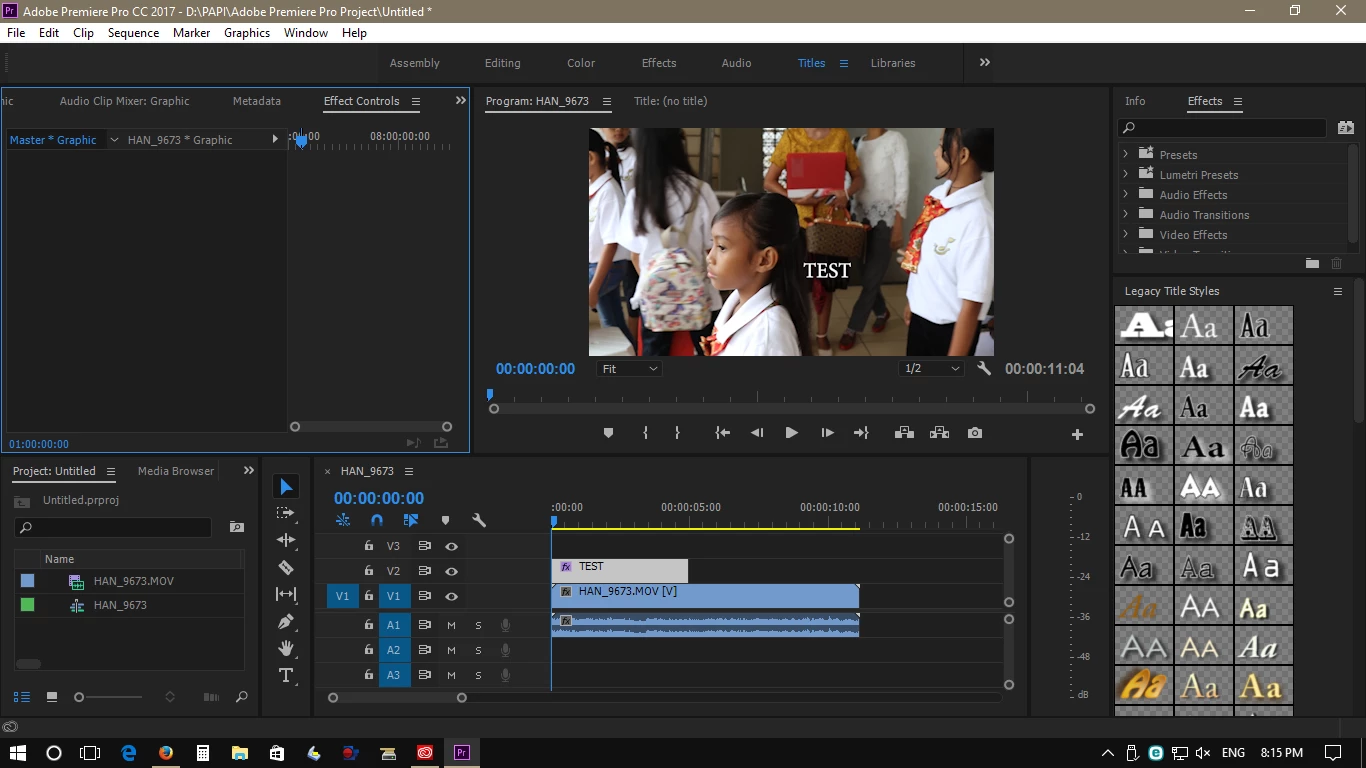
No graphics bar in Adobe Premiere Pro CC 2017.1

  • April 20, 2017
  • 6 replies
  • 27885 views

Recently I update the Adobe Premiere Pro CC to version 2017.1 (11.1.0) however I lost The Graphics Bar between Audi & Title Bar as per screenshot.

Please advise how to solve it.
    This topic has been closed for replies.

    6 replies

    Participating Frequently
    May 30, 2019

    2019.

    Updated to latest Premiere Pro.

    None of the solutions here work. My Master Graphic window is empty. I'm just trying to align text to the center of the screen. So annoying. Any fix for the current version?

    Ann Bens
    Community Expert
    Community Expert
    January 18, 2020

    Master Graphics window as in Legacy titler or EGP?

    2020 is the latest version.

    Participant
    August 18, 2017

    Hi everyone,

    I'm also facing same issue. There is no Essential Graphics panel in windows drop down and also Text tool is not showing as you can see in the above screen shots while having 11.0.1.... is there any solution?

    Thanks

    Ann Bens
    Community Expert
    Community Expert
    August 18, 2017

    having 11.0.1.... is there any solution?

    Yes update to 11.1.2.

    toeyl65337478
    Participant
    June 21, 2017

    I have tried everything mentioned above and I still cannot get any of the essential panels or workspaces to show up. I am using premiere pro CC 2017 Build 11.0.1 (6)

    stefan_gru
    Inspiring
    June 21, 2017

    Toey: What do you mean by "cannot get any . . . workspaces to show up"? What happens when you select Window > Workspaces from the main menu and choose one of the workspaces there? Please also post a screen shot of your Premiere Pro user interface.

    nickkoumalatsos
    Participant
    July 8, 2017

    Stefan, I have the same issue is Toey. Unchecked import layouts, I've reset Premiere, and deleted the layouts folder while the program was closed. Once I re open nothing is changed. I've even tried to close out and open a new project and still the same layout.

    Known Participant
    April 27, 2017

    Dear Stefan,

    Thank you for your kind advise, now it's working the Graphics bar appeared along with Assembly, Editing, Color, Effects, Audio, Libraries.

    The problem has solved.

    Best regards,

    Participant
    April 25, 2017
    Trent HappelCommunity ManagerCorrect answer
    Community Manager
    April 20, 2017
    stefan_gru
    Inspiring
    April 20, 2017

    Handjojo: Please let us know if this solved your problem. This Graphics work space button disappeared on me too and this fixed it for me but we'd like to know that it worked for you as well.

    Known Participant
    April 27, 2017

    Dear All,

    Thank you for your advise, however I still not get the Graphics Bar even I have followed the Trent Happel instruction as per screen shot:

    Or please give me the detail instructionwith picture.

    Thanks & B/regards
