richardg90679119
Participant
June 12, 2018
Answered

No 'locate' button when trying to attach proxy files

  • June 12, 2018
  • 1 reply
  • 400 views

I created proxy files for C300mkii footage on ingest. All good except that Premiere crashed so I had to do a 'force quit'.

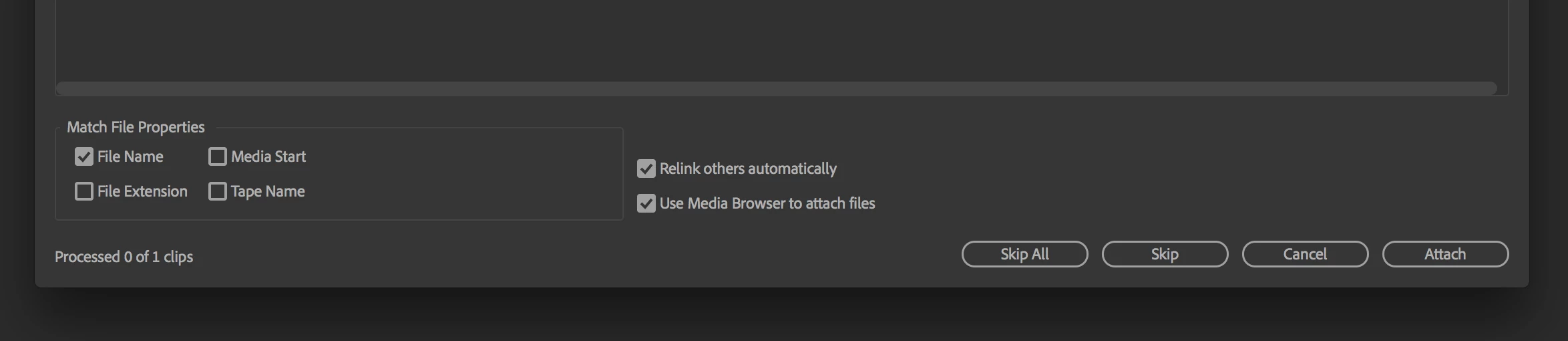
Now I'm trying to attach the proxy files manually, but when I Ctrl-click/Proxy/Attach proxies I'm led to the usual media locating panel where the original file (not the proxy) is preselected but with no way for me to manually navigate to the proxy files (I know exactly where they are). How do I manually navigate to reattach my proxy files?

Thanks!
This topic has been closed for replies.
Correct answer Jeff Bugbee

Click attach and the locate menu pops up.

1 reply

Jeff Bugbee
Community Expert
Jeff BugbeeCommunity ExpertCorrect answer
Community Expert
June 12, 2018

Click attach and the locate menu pops up.

richardg90679119
Participant
June 12, 2018

Many thanks Jeff.

It seemed unfamiliar compared to relinking offline clips which seems, from memory to immediately throw up the 'locate' option. This threw me. Thanks very much for the straightforward solution!

Regards

Richard