
Participant
August 3, 2023
Answered

No longer able to double-click and transform footage.
  • August 3, 2023
  • 1 reply
  • 184 views

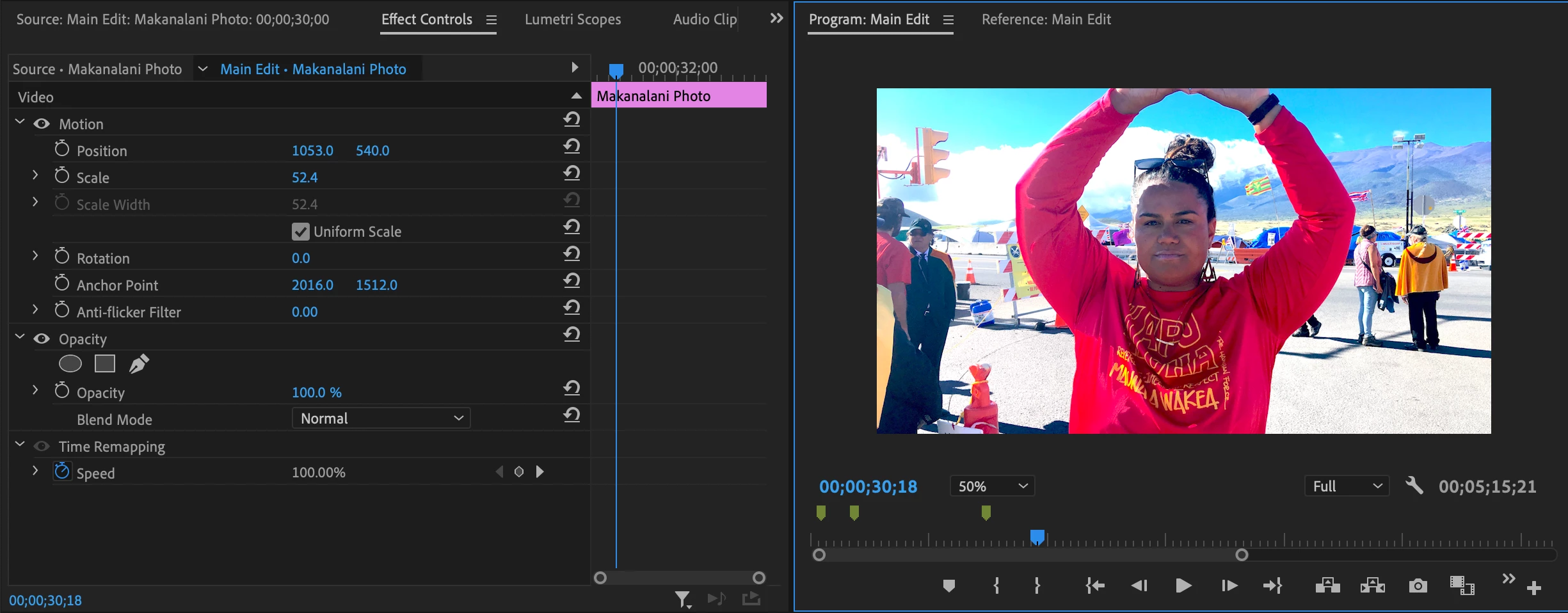
I used to be able to double-click my footage in the Program panel and the transform corners would pop out, so I can quickly adjust the sizing and placement of a video/photo within the frame. Now, the only solution I found is going into the Effect Controls panel and selecting Motion for the corners to pop-up. This is too slow for my workflow, why did the double-click ability disappear? 

This topic has been closed for replies.
Correct answer Ann Bens

You are not seeing the wireframe because you have the magnification set to 50%. Needs to be set to FIT.

Also the image is scaled up.............

1 reply

Ann Bens
Community Expert
Ann BensCommunity ExpertCorrect answer
Community Expert
August 3, 2023

You are not seeing the wireframe because you have the magnification set to 50%. Needs to be set to FIT.

Also the image is scaled up.............