


Participating Frequently
December 4, 2025
Answered

No longer getting Audio on track output assignment 3-4

  • December 4, 2025
  • 3 replies
  • 338 views

Hello, I'm hoping someone can help me diagnose the issue I'm having when assigning audio track output channels.

I'm delivering a project for broadcast with the following delivery reqs -

Stereo Program

· Chan 1 Left Stereo

· Chan 2 Right Stereo

· Chan 3 M&E

· Chan 4 M&E

I thought I had this set up and working but today when I went to export a second deliverable I suddenly had no audio on tracks assigned to Chan 3 and Chan 4. When I play back I can see the audio meters moving but no audio is coming out. I'm wondering if this is an issue with my system or with premiere.
I have my sequence and track output assignments set up like as shown in the screenshots.

ThanksSequence SettingsTrack Output assignments
Correct answer PaulMurphy

It sounds like you might not be monitoring Channels 3 and 4 because you're listening on stereo speakers, which typically only output Channels 1 and 2.

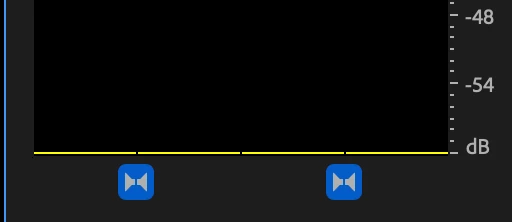
To monitor all audio channels through your stereo output, try clicking the "bowties" icon at the bottom of the Audio Meters. This lets you monitor all channels through your current audio hardware.

868165iCF404592B3EE16CF.png


Another good test is to import the exported file back into Premiere Pro, load it into the Source Monitor, and play it. Premiere will sum all channels to mono for playback in the Source Monitor, so if there's audio on Channels 3 and 4, you should hear it there.

From your screenshots, I can see that Track 1 and Track 2 are routed to Output Channels 1 and 2, while all other tracks are assigned to Channels 3 and 4. That routing looks correct for your delivery spec.

3 replies

PaulMurphyCommunity ExpertCorrect answer
Community Expert
December 6, 2025

It sounds like you might not be monitoring Channels 3 and 4 because you're listening on stereo speakers, which typically only output Channels 1 and 2.

To monitor all audio channels through your stereo output, try clicking the "bowties" icon at the bottom of the Audio Meters. This lets you monitor all channels through your current audio hardware.

868165iCF404592B3EE16CF.png


Another good test is to import the exported file back into Premiere Pro, load it into the Source Monitor, and play it. Premiere will sum all channels to mono for playback in the Source Monitor, so if there's audio on Channels 3 and 4, you should hear it there.

From your screenshots, I can see that Track 1 and Track 2 are routed to Output Channels 1 and 2, while all other tracks are assigned to Channels 3 and 4. That routing looks correct for your delivery spec.

Participating Frequently
December 7, 2025

Ahh yep, it really was that simple. Thank you!

R Neil Haugen
Legend
December 5, 2025

Your list looks like traditional duo-mono for "stereo" ... is it supposed to be a single stereo track, or two mono tracks, one Left, one Right? As that is the 'duo-mono' used in many pro workflows.

Everyone's mileage always varies ...
Kevin J. Monahan Jr.
Legend
December 5, 2025

Hi,

Thanks for the post. Can we get a shot of your Audio Hardware Preferences? @PaulMurphy can you take a look? I hope we can help you. Sorry for the hassle.


Thanks,
Kevin


Kevin Monahan - Sr. Community and Engagement Strategist – Adobe Pro Video and Audio