
Participant
February 13, 2024
Answered

no sequences

  • February 13, 2024
  • 2 replies
  • 559 views

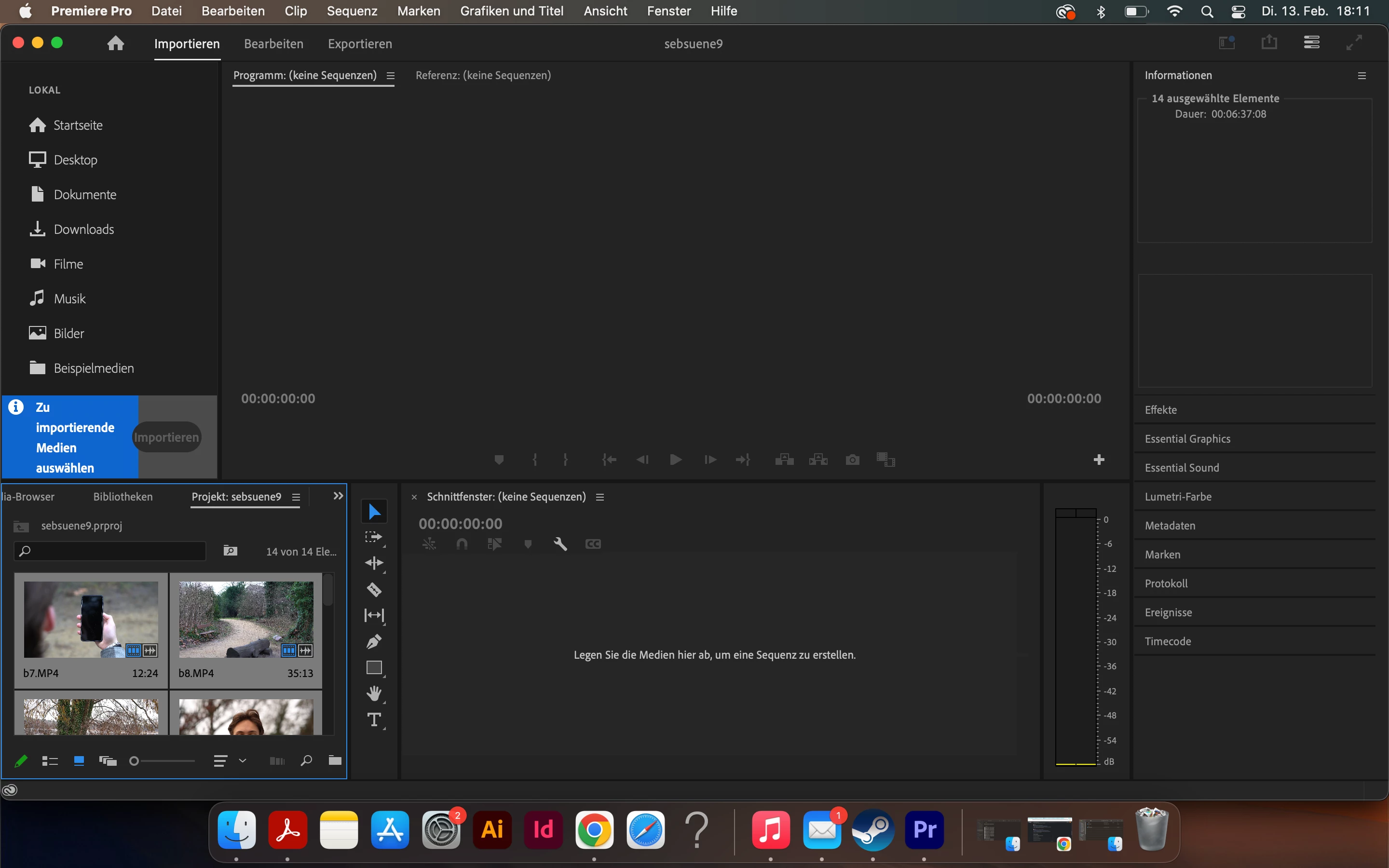
So i have cut my movie in several projets, so i could have one project for every scene. After i was finished and wanted to open my older projects, they would open but im not able anymore to edit the clips or export them. Usually, there would be a sequence for every project, but when i now open it, theres is no sequence, just the raw files in another window. There u can see my problem(sorry that it is in german)

Can anyone help me with this or had the same issues as me?
This topic has been closed for replies.
Correct answer Averdahl
quote

Can anyone help me with this or had the same issues as me?


By @Tillmann35431846g8g8


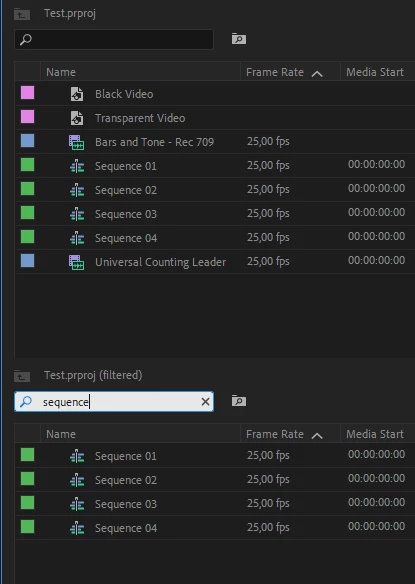
There are several ways to find closed/open sequences. One of them is to simpy type the word sequence in the Filter Bin Content. This will filter out all sequences in the project. (See the attached image)


The top image here shows all content in the Project panel. The bottom image shows that i have typed in the word sequence and as you can see all four sequences in that project is filtered out.


I don´t know if it´s enough to type sequence or if you must use the german word for it. 


Another way is to set the view in the Project panel to List View since both Icon view and Freeform view very effectively hides things. Personally i get a better overwiev when i use List view. Better overview is good to have when looking for something.


2 replies

Averdahl
Community Expert
AverdahlCommunity ExpertCorrect answer
Community Expert
February 15, 2024
quote

Can anyone help me with this or had the same issues as me?
 

By @Tillmann35431846g8g8


There are several ways to find closed/open sequences. One of them is to simpy type the word sequence in the Filter Bin Content. This will filter out all sequences in the project. (See the attached image)


The top image here shows all content in the Project panel. The bottom image shows that i have typed in the word sequence and as you can see all four sequences in that project is filtered out.


I don´t know if it´s enough to type sequence or if you must use the german word for it. 


Another way is to set the view in the Project panel to List View since both Icon view and Freeform view very effectively hides things. Personally i get a better overwiev when i use List view. Better overview is good to have when looking for something.


Participant
February 16, 2024

thank you very much. now i can restore my work from before. You saved my project!

Kevin-Monahan
Community Manager
Community Manager
February 13, 2024

Hi @Tillmann35431846g8g8,

Thanks for the info. Looks like your interface is jumbled, so let's clean that up first. You are currently in "Import" mode. Instead, click "Edit" (Bearbeiten) mode. Then, choose Window > Workspace > Reset to Saved Layout. Put your Project panel in List mode. Your interface should then be workable once more.


Can you see any sequence icons? If so, double-click the sequence you want to work on, and you can edit it again. See if that works for you.


Thanks,
Kevin

Kevin Monahan - Sr. Community & Engagement Strategist – Pro Video and Audio
Participant
February 13, 2024

so i just did what u told me and i still get the same result that i cant edit my projects and there are no sequence icons.

Kevin-Monahan
Community Manager
Community Manager
February 13, 2024

Sorry to hear that, @Tillmann35431846g8g8. Can you please show us a screenshot of your interface? I hope we can help you locate your sequence.


Thanks,
Kevin

Kevin Monahan - Sr. Community & Engagement Strategist – Pro Video and Audio