
Participating Frequently
December 5, 2018
Answered

No sound with video files

  • December 5, 2018
  • 3 replies
  • 4466 views

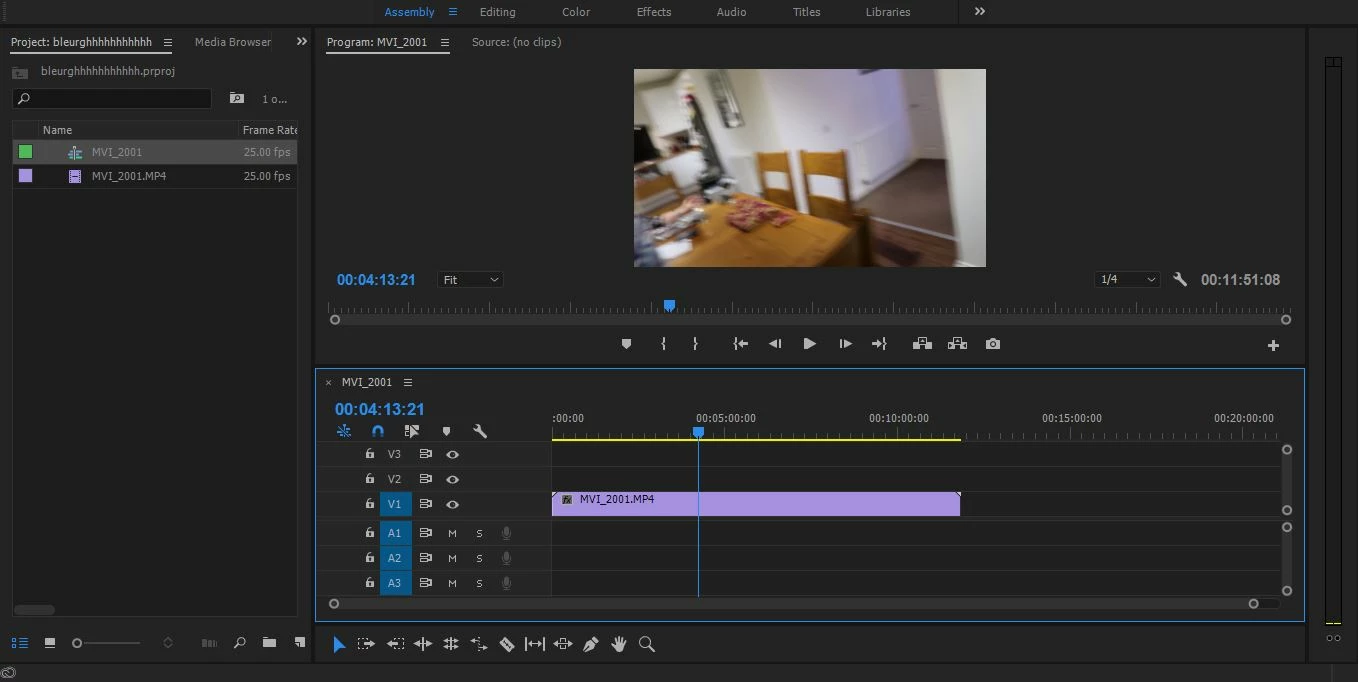
Every video I have tried to put into my timeline has no audio now. Also, I'm pretty sure the logo for the video file type is different. Everything was fine the other day and all the times before that, but I've got no idea how to fix this.
    This topic has been closed for replies.
    Correct answer Ann Bens

    Media was created on a camera (Canon Powershot GX7 MK2).

    It's saved on the camera's memory card that's plugged into my computer. (However, every video media file I've tried that is on my computer, so downloaded MP4's, and phone footage as well, all have the same problem anyway).

    I'm clicking import from the dropdown bar in the top left of Premiere which says "file" and then clicking "Import".


    You need a card reader: pop the card in and copy entire card to hdd first, then ingest.

    3 replies

    Lukas Engqvist
    Community Expert
    Community Expert
    December 5, 2018

    One more option to recode a video would be to change format using Adobe Media Encoder. Add the video to the Encoder runlist and choose another format that you know has worked.

    Participating Frequently
    December 5, 2018

    Thanks for all the feedback. Every video that I have tried to put into Premiere have audio. I've tried a range of videos, from stuff shot with our camera to videos from YouTube. So a lot of the videos are ones that I've put into Premiere before and have been fine. So still unsure of what to do next.

    Thanks.

    Participating Frequently
    December 5, 2018

    By "Every video that I have tried to put into Premiere have audio" I mean that outside of Premiere.

    Ann Bens
    Community Expert
    Community Expert
    December 5, 2018

    Is this phone footage? If so,

    Run the file through HandBrake set it to constant framerate and try again.

    R Neil Haugen
    Legend
    December 5, 2018

    See the blue blocks of V1/A1 ... to the left of the sequence? If you're bringing in media from the Source monitor or project panel, past the first clip, you need to have the left most blocks set, one for video, one for audio

    This might be your issue.

    Neil

    Everyone's mileage always varies ...
    Ann Bens
    Community Expert
    Community Expert
    December 5, 2018

    Dont think its a source patching issue.

    The mp4 is imported into Premiere without audio (see icon in the PW, also file is colored purple instead of blue)

    R Neil Haugen
    Legend
    December 5, 2018

    Then knowing what created that mp4 and how imported would be useful ...

    Neil

    Everyone's mileage always varies ...