Participant
August 14, 2019
Answered

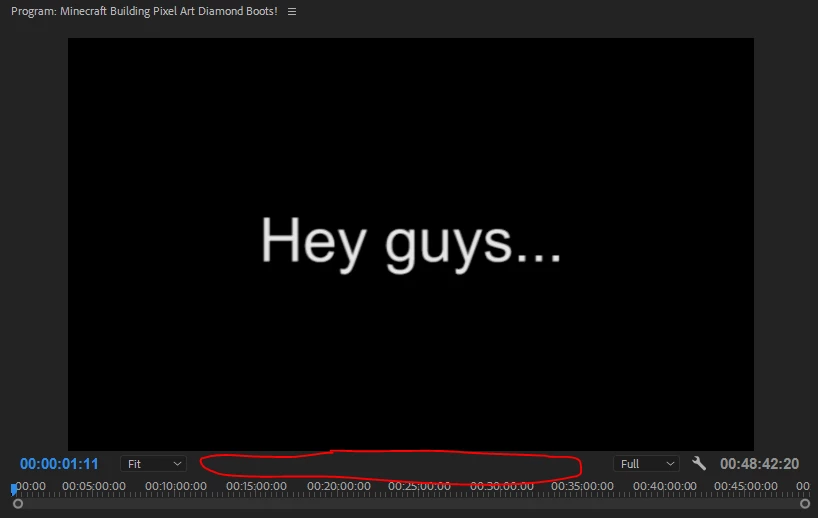
None of the buttons are showing up on the preview window

  • August 14, 2019
  • 3 replies
  • 867 views

Please help me, none of the buttons in the preview window are showing up so I am having trouble with editing. I usually use the buttons quite frequently when editing. Please tell me how to get the buttons back. Thank you!

This topic has been closed for replies.
Correct answer MyerPj

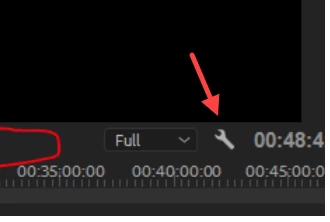
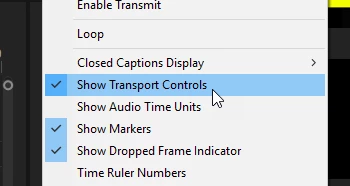
Click the Wrench and "Show Transport Controls"

3 replies

Community Expert
August 14, 2019

or try resetting your workspace: Window>Workspaces>Reset to Saved Layout.

If that doesn't help, quit, and restart while holding down Shift+Option or Shift-Alt(pc)

hope this helps!
mark

headTrix, Inc. | Adobe Certified Training & Consulting
MyerPj
Community Expert
Community Expert
August 14, 2019

That all seems pretty heavy handed Guys. It's a actually an option and on my system it prevails across work spaces. No need to delete one's preferences when it's working correctly.

Community Expert
August 14, 2019

It is necessary when I think the question is what is enclosed in green (the area that vipers26125600 points out), not what is enclosed in red (Transport Controls). I thought that what the user needed to see was the video and audio icon.

Byron.
Community Expert
August 14, 2019
MyerPj
Community Expert
MyerPjCommunity ExpertCorrect answer
Community Expert
August 14, 2019

Click the Wrench and "Show Transport Controls"

Participant
August 14, 2019

It worked! Thank you for your help!