

not able to delete effects preset
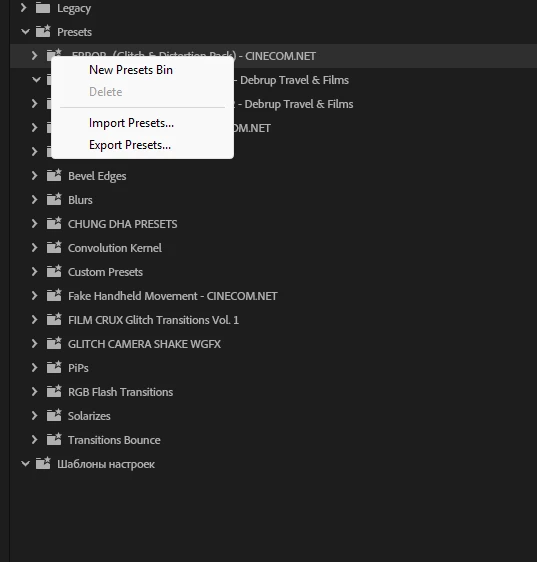
Bug Report: Cannot Delete Imported Preset Bins from Effects > Presets (Premiere Pro 2026)
Premiere Pro Version: 26.x (Latest Release)
Operating System: Windows 11
Issue Type: Effects Presets / UI / Preset Management
Summary
Premiere Pro allows me to import .prfpset files into the Effects > Presets panel, but it does not allow me to delete the imported preset bins (folders).
The only way to remove a preset pack is to manually delete every preset inside the folder. Even after the folder becomes completely empty, the empty folder often remains visible and cannot be deleted.
Steps to Reproduce
-
Open Premiere Pro 2026.
-
Open the Effects panel.
-
Import any
.prfpsetpreset pack. -
The imported preset appears as a folder under Presets.
-
Right-click the folder.
Actual Result
-
There is no option to delete the preset folder.
-
The Delete option is disabled (greyed out).
-
Pressing the Delete key does nothing when the folder is selected.
-
Individual presets inside the folder can be deleted.
-
After deleting all presets, the folder becomes empty but often remains visible.
-
Restarting Premiere sometimes removes the empty folder, but not consistently.
Expected Result
Users should be able to:
-
Delete an imported preset folder directly.
-
Or automatically remove the folder immediately after its last preset has been deleted.
-
Empty preset bins should never remain permanently in the Effects panel.
Additional Information
I performed the following tests:
-
Created a completely fresh preset library by renaming
Effect Presets and Custom Items.prfpset. -
Opened Premiere so it generated a new empty preset library.
-
Imported a test preset pack.
-
The issue still occurs.
This confirms the problem is not caused by an old or corrupted preset library.
The preset file itself is not read-only, and Premiere has full write permissions.
Current Workaround
The only available workaround is:
-
Delete every individual preset inside the folder.
-
Restart Premiere.
-
Hope the empty folder disappears.
For large preset packs containing hundreds of presets, this is extremely time-consuming.
Why This Should Be Fixed
Many editors organize presets into folders by creator or category. Over time, users naturally want to remove preset packs they no longer use.
Currently there is no practical way to remove an imported preset bin, even when it is empty.
A simple Delete Preset Bin command or automatic removal of empty preset folders would make preset management much easier.
Request
Can Adobe confirm whether this is:
-
An intended design decision,
-
A known bug in Premiere Pro 26.x,
-
Or an issue that is planned to be fixed in a future update?
Thank you.


 AdChoices