
NVIDIA GeForce 920M - Incompatible Video Driver/ Controlador del Vídeo Incompatible
Dear Community,
Every time I enter Adobe Premiere Pro it shows the following message:
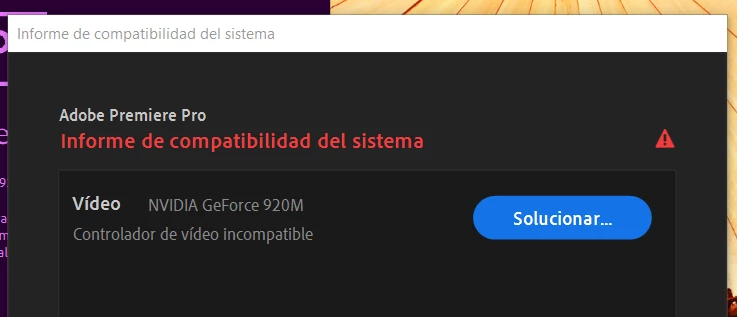
I followed all the links suggested by ADOBE: they talk about the installation of the NVIDIA and INTEL drivers. I installed the latest versions of both, I updated my PC to the latest version of windows 10 and I still get the same message.
One of the Adobe Support links mentionned that there are different types of drivers: DHC or Standard. The page helps you to identify the one installed in your computer entering the control panel and then, ask you to enter to the next link to download the last drivers:
https://www.nvidia.com/Download/index.aspx?lang=es
However, when I enter all the data required, Download Type > Studio Driver > Search (since I only need to use the design applications, I am not a gamer), it says that there is no driver to offer. When I changed it to a Game Ready Controller JUST TO TRY, I was offered a driver I downloaded it, installed it, REBOOTTED the PC and still, I kept getting the same error.
At some point I read something about CUDA 9.2 for Windows 10, saying that it is not a requirement to run Adobe video applications, it applies only "if you prefer graphics acceleration". Therefore, I understand that it does not serve my purpose.
I also tried uninstalling all the NVIDIA programs and reinstalled them, restarting each time.
Please, somebody give me a hand..
-----------------------------------------------------------------------------------------------------------------------------------------------
Estimados,
Cada vez que ingreso al Adobe Premiere Pro me salta la siguiente imágen:
Ingresé a todos los links habidos y por haber dónde hablan de la instalación de los controladores NVIDIA e INTEL, instalé las últimas versiones de ambas, actualicé mi PC a la última versión de windows 10 y me sigue saltando lo mismo.
Cuando ingreso al soporte de Adobe te explican que hay diferentes tipos de Driver: DHC o Estándar, te ayudan a identificar el que uno tiene instalado desde el panel de control y te piden que ingreses al siguiente URL para descargar los últimos controladores:
https://www.nvidia.com/Download/index.aspx?lang=es
Sin embargo, cuando ingreso todos los datos que me piden y pongo en Tipo de Descarga > Controlador Estudio > Buscar (dado que sólo necesito usar las aplicaciones de diseño, no soy gamer), dice que no hay ningún controlador para ofrecer. Cuando lo cambié por Controlador Game Ready SÓLO PARA PROBAR, ahí sí me ofrecieron un controlador. Lo descargué, lo instalé, REINICIÉ LA PC y así todo, me siguió saltando el mismo error.
Les juro por dios que ya no sé con qué probar, en algún momento leí que se mencionaba el CUDA 9.2 para Windows 10, diciendo que no es un requisito para ejecutar las aplicaciones de vídeo de Adobe, aplica "si prefiere la aceleración de gráficos". Por lo tanto, entiendo que no sirve para mi propósito.
También probé desinstalando todos los programas de NVIDIA y los volví a instalar, reiniciando todas la veces.
Por favor les pido, que alguien me de una mano..


 AdChoices