
Participant
March 28, 2021
Question

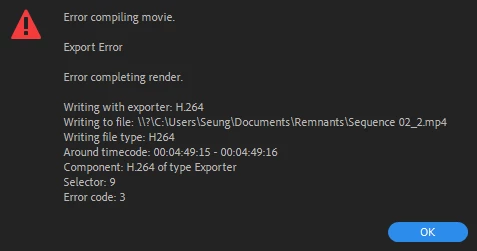
Nvidia GPU causes "Error compiling movie. Export error."

  • March 28, 2021
  • 2 replies
  • 712 views

I get this random error when trying to export, there is nothing wrong with my footage and the timecode switches randomly every errors.

Apparently I found a temporary fix to this, by adding bitrates or lessening them but it does not work constantly with it, i still get crashes in the future and I would have to adjust the bitrate again. A huge waste of time.


I just want to have a nice render where I know no error is going to happen soon and I would have to tweak settings everytime...

-Using software encoding does not cause any trouble, it is clearly a GPU problem with premiere

-Using Media Encoder have the same problem

-I'm using the latest Studio Driver

-This occurs on Premiere 2020/2021

-Sequence Settings:


1920 x 800
00;05;09;10, 23.976 fps
48000 Hz - Stereo
Color Space: Rec. 709

-Nikon D7500 Footages:


Type: MPEG Movie
File Size: 71.89 MB
Image Size: 1920 x 1080
Frame Rate: 23.976
Source Audio Format: 48000 Hz - 16-bit - Stereo
Project Audio Format: 48000 Hz - 32 bit floating point - Stereo
Total Duration: 00:00:28:09
Pixel Aspect Ratio: 1.0
Alpha: None
Video Codec Type: MP4/MOV H.264 4:2:0 (Full Range)


I've tried and didn't work :
-Rolling back drivers

-Reseting Preferences

-Reseting workspace

-Cleaning Media Cache Files


Specs:

Ryzen 7 2700x

GTX 1660 Super

8x2 3200 MHZ RAM
240gb SSD Sandisk


This topic has been closed for replies.

2 replies

Community Expert
April 16, 2021

You've tried a lot of things and I can't say I know exactly what is going on with your encoding. Looking forward to seeing a response from some more technical users. But what I can tell you is that Hardware Encoding is relatively new, as you probably know, so it's definitely subject to more issues than Software Encoding. In my experience, Software Encoding is a more reliable render anyway, with fewer render issues even if it is successful, so I would personally recommend using that anyway for your final encodes, or better yet, encode to a high quality master like one of the flavors of Quicktime ProRes and then make your compressed deliverable from that.

NARA John
Participant
April 16, 2021

Out of nowhere, I'm having the same problem with my Dell laptop (Windows) with a Nvidia GEForce GTX 1060 (w/ Max Q Design) card. Using CUDA hardware acceleration, it quickly freezes and crashes during rendering. It also hangs up the Windows OS and I have to restart to regain all system resources. It renders okay when I switch to software-only rendering. This problem appeared out of nowhere around the same time as you've reported your issue. I haven't changed drivers or preferences. The Nvidia card and Adobe Premiere and Medida Encoder have worked well together for over 3 years on this laptop. I'm not sure what's going on.