


Participating Frequently
February 20, 2018
Answered

Nvidia OpenGL Driver crash on startup

  • February 20, 2018
  • 17 replies
  • 36477 views

Hi, I am having a really annoying issue with Premiere Pro CC 2018.

Ever since the latest Windows 10 Creators Update Premiere consistently causes the Nvidia OpenGL Driver to crash upon loading a project. Specifically, it crashes once Premiere tries to load the first videoclip into the preview monitor. Opening JUST the program works fine.
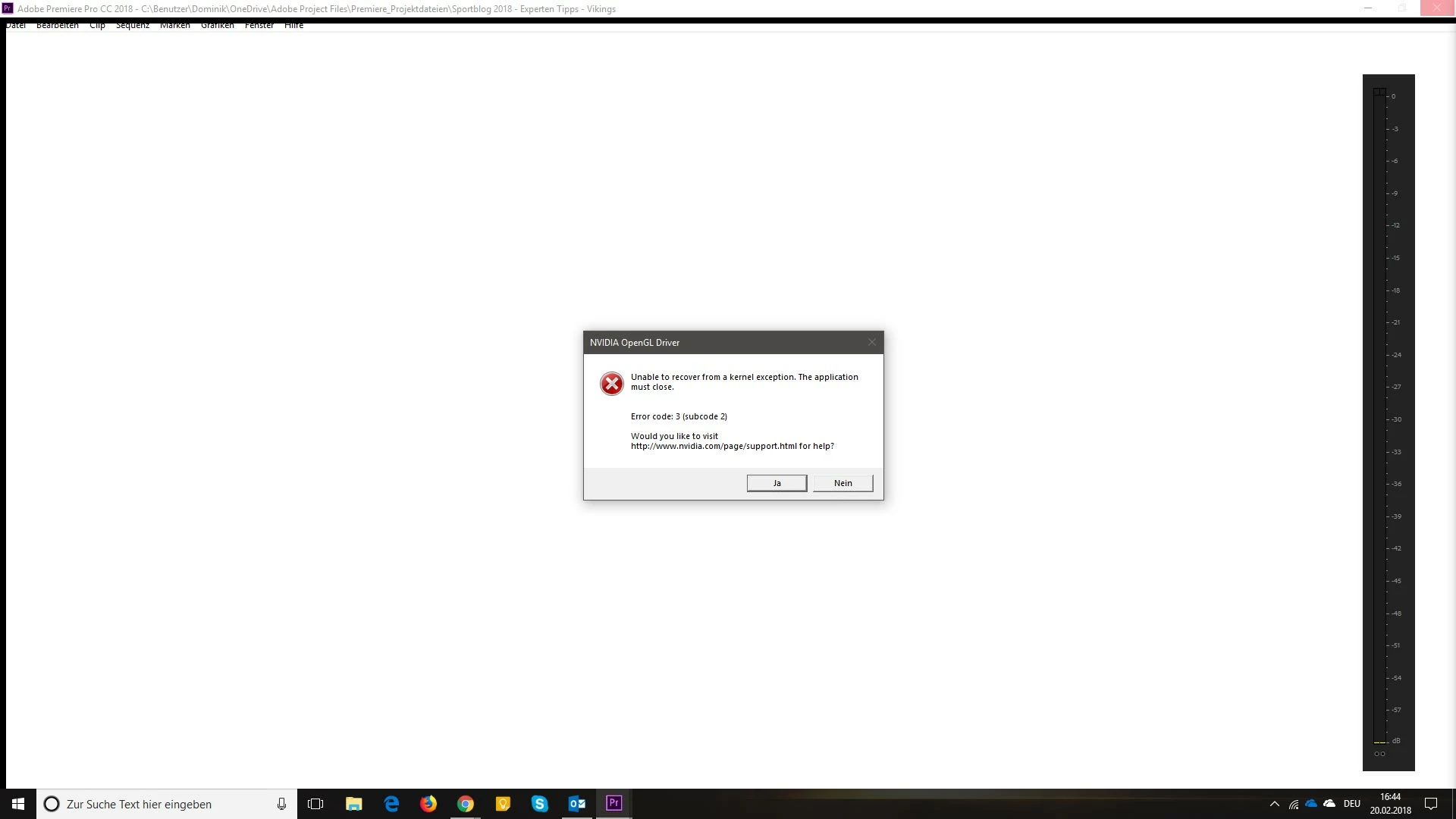
Windows gives these error reports (sorry, they are in German):

Quelle

Adobe Premiere Pro CC 2018

Zusammenfassung

Nicht mehr funktionsfähig

Datum

‎20.‎02.‎2018 16:44

Status

Der Bericht wurde gesendet.

Beschreibung

Pfad der fehlerhaften Anwendung: C:\Program Files\Adobe\Adobe Premiere Pro CC 2018\Adobe Premiere Pro.exe

Problemsignatur

Problemereignisame: BEX64

Anwendungsname: Adobe Premiere Pro.exe

Anwendungsversion: 12.0.1.69

Anwendungszeitstempel: 5a4defd6

Fehlermodulname: nvoglv64.dll

Fehlermodulversion: 23.21.13.9077

Fehlermodulzeitstempel: 5a67b485

Ausnahmeoffset: 0000000000fde979

Ausnahmecode: c0000409

Ausnahmedaten: 0000000000000007

Betriebsystemversion: 10.0.16299.2.0.0.768.101

Gebietsschema-ID: 3079

Zusatzinformation 1: 7a26

Zusatzinformation 2: 7a26cd0dd2f7883f2e807cfd8dcb829c

Zusatzinformation 3: 5e40

Zusatzinformation 4: 5e400ab0022931b1faaca398e3eb9b37

Weitere Informationen über das Problem

Bucket-ID: 381734f7dec2a3b7b000a7843b520698 (1153105690979600024)

------------------------------------

Unable to recover from a kernel exception. The application must close.

Error code: 3 (subcode 2)

(pid=4740 tid=2144 adobe premiere pro.exe 64bit)

-------------------------------------

I am using a Quadro M4000 with the latest ODE-Driver 390.77.

Funny enough, if I open Premiere right after booting my machine, it usually opens fine and I can work with it for as long as I want without any errors. Only when I open other programs like my browser or my mail client, sometimes even just browsing folders, causes Premiere to crash the OpenGL driver upon launching later on.

I already talked to a Nvidia support member, they made me try different power settings on my machine and in the Nvidia Control panel, but that didn't change anything. So they told me to report this problem here as well to see if there are any known issues or solutions to that problem.

Some ideas what's happening here? Thanks in advance!
This topic has been closed for replies.
Correct answer Lomarx

Today when switching between youtube and premiere i got the error with 391.03.

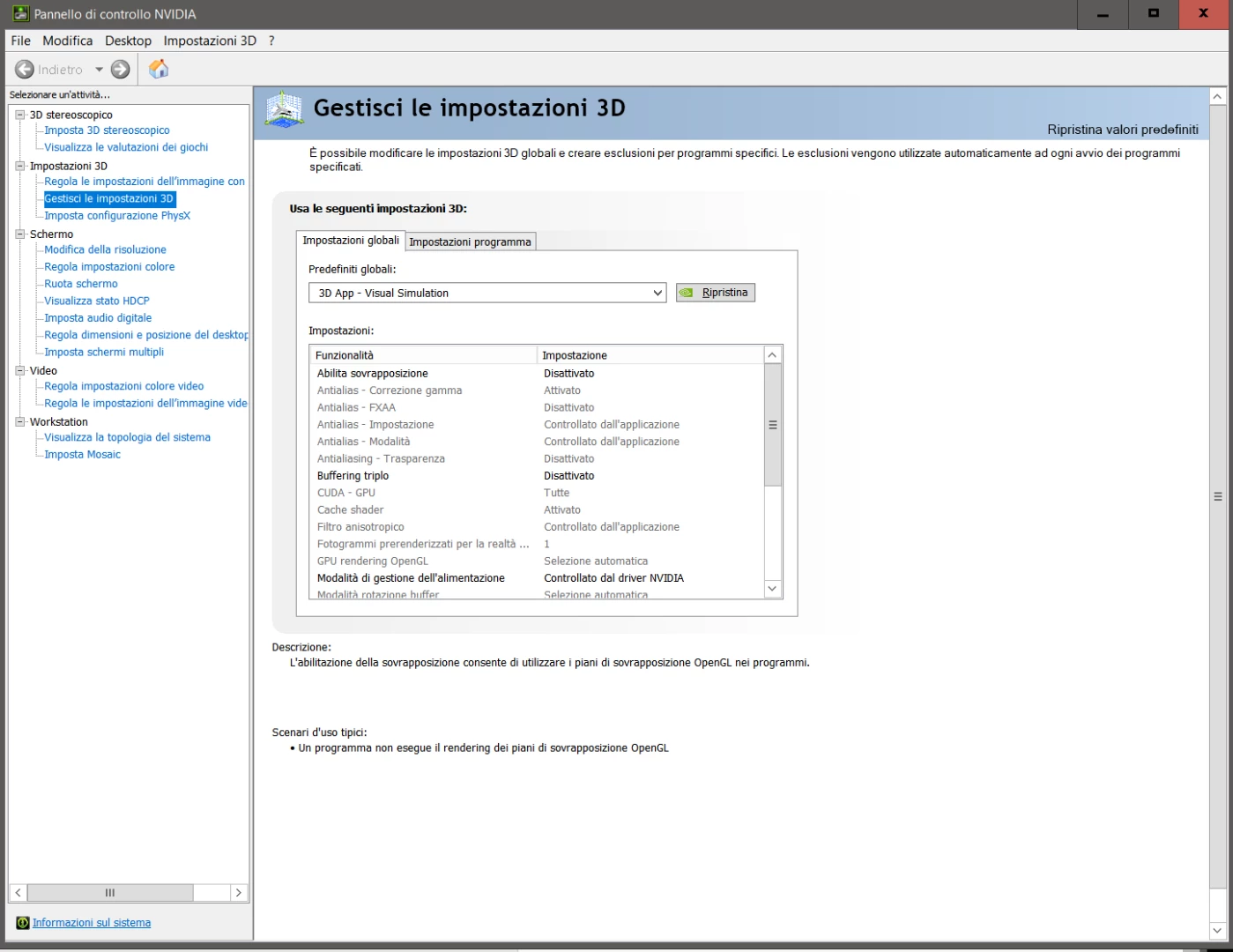
What is the visual simulation that you talking about?

Best.


You can find it in the NVIDIA Control panel, this is in italian but i hope you can understand where it is:

and, yes, with this setting seems there is no more OpenGL error.

Alex

17 replies

Participant
April 25, 2018

Hi Evevrybody, I have the same issue with K5200 Win 10 and APP 2018, but today Nviidia release a new version. I wil try it, I hope that´s works fine.

lacey1000
Participant
April 19, 2018

Same issue here. I've tried backdating the driver to the 390 build and it still will not load. The only way I could get it to work is by removing the nvidia driver. It works instantly but I have no 3D within photoshop. All my adobe apps are affected and will not launch

jho678Author
Participating Frequently
April 23, 2018

Even with the latest Updates of Adobe CC and the latest Nvidia Drivers, the problem is still the same. Seems like nobody really cares about this issue on both sides, Adobe and Nvidia. But hey, let's keep selling our professional premium products that actually don't work!

Participant
April 10, 2018

I'm having the same issue. Quadro M4000 running driver version 391.33 Very frustrating.

Participating Frequently
February 27, 2018

I have a Quadro M2000, English versions of everything, and all the updates (Windows, Adobe).  I have upgraded from Nvidia driver version 390.65 to 390.77 and I am having the same problem.

On the positive side, I have noticed a much lower CPU utilisation when playing back video files using the default Windows player.  So, perhaps, there are some performance improvements in the driver, but some bugs at the same time.

Could someone from Adobe try to push Nvidia for a fix.  The bug is very easy to reproduce as described in this thread.

Matt Young14394008
Legend
March 1, 2018

Same issue here with a Quadro K2200 and Nvidia driver version 390.77. 

At the end of the day yesterday video playback in the preview window slowed to a crawl while the audio continued on at normal speed. I closed Premiere and reopened, and have had the above error message every time since.  Haven't been able to do my work all day long.

Matt Young14394008
Legend
March 1, 2018

Something useful:  I followed the advice of "birdy" in the post here https://devtalk.nvidia.com/default/topic/1029897/quadro-display-driver-nvlddmkm-stopped-responding-with-adobe-premiere-/  and was immediately up and editing again.  Hope this helps someone else as well.

Grigor Poghosyan
Participating Frequently
February 25, 2018

You may try to restore your system to a point when you clearly remember that everything was ok. Save all the files you need then restore Your Windows.

thepooltm
Participant
February 26, 2018

Our Windows and PC are completely new, we can't restore anything

Legend
February 24, 2018

One thing you might try is language consistency.  Install English version of Adobe software only on an English version of Windows.  Install German Adobe software on German Windows.

thepooltm
Participant
February 25, 2018

Our Windows are installed in Spanish and Premiere too. Additionally, we have four Windows and Premiere in english.

Everyone has that problem

Legend
February 25, 2018

The posted image shows mixed languages.  Something is non-standard there.

thepooltm
Participant
February 24, 2018

the same happens to me with Premiere and Aftereffects

Participating Frequently
February 26, 2018

same here.

where the hell is the Adobe chat?