


Inspiring
June 19, 2026
Question

Once again, I'm seeing colored dots in the program... what's going on with the program?

  • June 19, 2026
  • 3 replies
  • 65 views

I've already encountered this problem in older versions of the program. When I play a video, dots appear at the bottom of the screen. When I pause the video, the dots disappear.
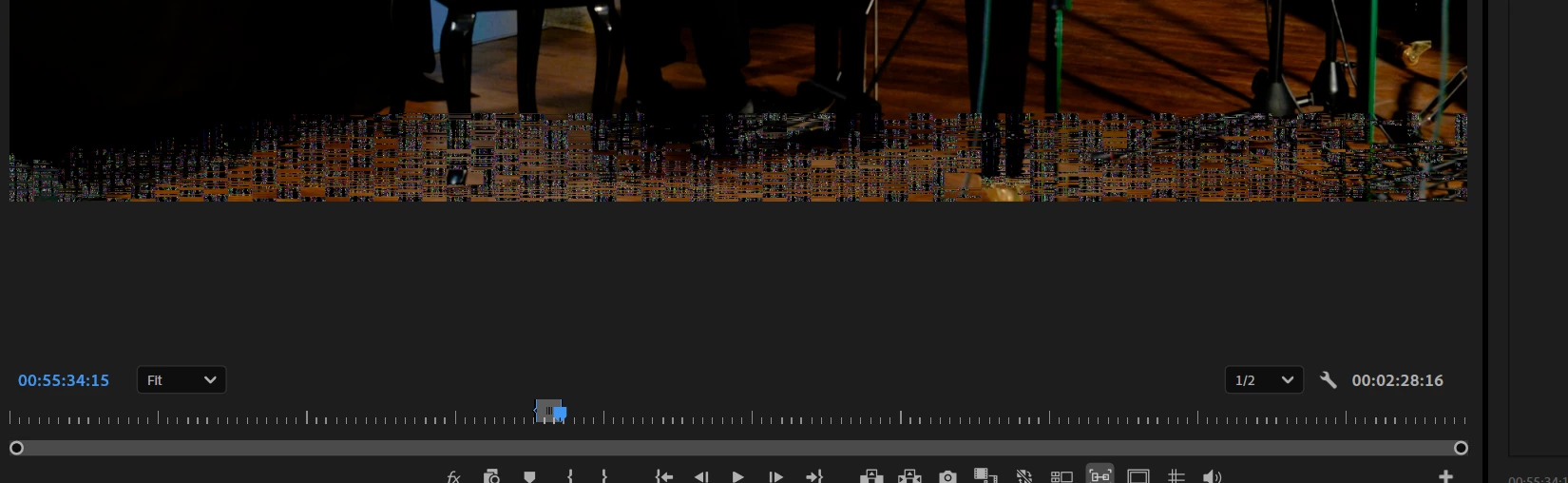
I updated several versions of the program, I updated several versions of the drivers, I upgraded my graphics card, I upgraded my SSD, I updated the BIOS, I replaced the CPU thermal paste, and I updated Windows. And yes—I cleared the cache))) Especially for fans of this feature) I actually cleared and re-created the cache on the new drive. So how do I fix this problem? What else do I need to update to get rid of the dots? I'll say it again—this only happens in Premiere. The files themselves are fine; they display normally everywhere else.


    3 replies

    Community Expert
    June 20, 2026

    What is the codec and frame rate of your media?
     

    A few things to check:

    • Does this happen when you play back at Full resolution?
    • Does it happen with High Quality Playback enabled in Program Monitor > Settings (wrench icon)?
    • In Program Monitor > Settings, are you using different Playback Resolution and Paused Resolution settings?
    Inspiring
    June 20, 2026

    I work at a resolution of ½. I don't use High Quality Playback—it requires at least 32 GB of video memory and a 200-core processor. I have no idea why this option even exists if it requires a computer on par with a NASA-grade system 😁 I work at 25–50 frames per second. MPEG-4 (MP4) (Codec ID) — hvc1


    Community Expert
    June 21, 2026

    HEVC (hvc1) is a delivery codec, optimized for smaller file sizes. It is not well suited to editing. This is why it plays smoothly outside of Premiere, but causes instability once you start editing with it.
     

    Your timeline is close to three hours long. That puts a real strain on your system, even at 1/2 resolution. How much RAM do you have installed? That will help confirm whether memory is part of the issue.
     

    Eiher way, I'd recommend creating proxies of your footage (half resolution, using a codec like ProRes Proxy). I think you'll see editing and playback performance improve significantly.
     

    High Quality Playback simply applies extra processing during playback for a sharper preview. I often use it for effects work and old machines with minimal RAM and it plays fine. That said, it doesn't sound like the cause of the dots you're seeing here.

    John T Smith
    Community Expert
    Community Expert
    June 19, 2026

    Do not count on Windows to be fully up to date when it comes to device drivers
    Go to the vendor site to be sure you have an updated driver for your graphic adapter
    There have also been reports in the past that the latest driver is not the best driver
    .
    Also check (copied link) https://www.tomshardware.com/reviews/gpu-hierarchy,4388.html

    .
    https://helpx.adobe.com/premiere-pro/kb/gpu-and-gpu-driver-requirements-for-premiere-pro.html

    .
    nVidia Driver Downloads https://www.nvidia.com/Download/index.aspx?lang=en-us

    -for all Adobe programs use the STUDIO driver, not the GAMING driver
    -To achieve the highest level of reliability, Studio Drivers undergo extensive
    -testing against multi-app creator workflows and multiple revisions of the top
    -creative applications from Adobe to Autodesk and beyond
    .
    If you have a laptop you MAY also need to check for a laptop specific nVidia driver
    -SOME laptops require an approved driver from the laptop company, not nVidia
    .
    AMD/ATI Driver https://www.amd.com/en/support

    .
    Intel https://downloadcenter.intel.com/product/211969/Intel-HD-Graphics-Family

    https://www.askwoody.com/newsletter/free-edition-working-with-the-intel-driver-support-assistant/


    Inspiring
    June 19, 2026

    I have a computer)   I work with video and use only Studio drivers. I won't install any other software

    Peru Bob
    Community Expert
    Community Expert
    June 19, 2026

    If NVIDIA, are you using Studio drivers?

    Inspiring
    June 19, 2026

    I work with video and use only Studio drivers. I won't install any other software