

Bed30321077z973
Inspiring
November 21, 2023
Answered

One single sequence = multiple videos exported. Is that possible?

  • November 21, 2023
  • 2 replies
  • 1175 views

Let's say I am working on a long video, and I was able to cut it fast into multiple video clips on my track/sequence,

Now I just want to export the resulting videos ( witht the audios available in the audio track etc), each video is associated to a a part of the track, like this:
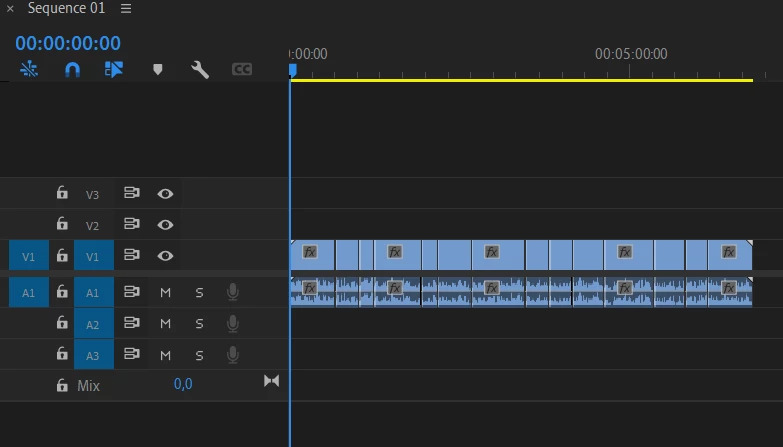
 

For example this should produce 14 differents videos.


That's my desire!

I need it.

Is it possible to achieve it?

I selected all 14 video clips and did a rigth click (> create  subsequcence, but it created only one I think)

Is there a way to do it manuallay?

(As for coding, I did not explore panels and sequences yet to see if its possible)


Summary: I dont want to drag and drop every video clip from those 14 ones into a nexw sequence, in order to be able to export it into a separate video, I 'd ratehr obtain separate videos (multiple videos) from thisone single sequence.

This topic has been closed for replies.
Correct answer Dan McSweeney

Without scripting, there is no way to achieve a full automation of this - but you can get close

You can select each clip individually, make it a nested sequence, and then select all of the nested sequences and export them all at once to AME.
As a time saving tip, you can set a keyboard shortcut to make a nested sequence.
The process is shown in this video.

https://www.youtube.com/watch?v=dAljQaz6NTc&t=94s

2 replies

Dan McSweeneyCorrect answer
Adobe Employee
November 21, 2023

Without scripting, there is no way to achieve a full automation of this - but you can get close

You can select each clip individually, make it a nested sequence, and then select all of the nested sequences and export them all at once to AME.
As a time saving tip, you can set a keyboard shortcut to make a nested sequence.
The process is shown in this video.

https://www.youtube.com/watch?v=dAljQaz6NTc&t=94s

Bed30321077z973
Inspiring
November 21, 2023

That sounds awesome, I liked this little fast explanation video, however there is a problem I notice? The "nested sequences" only contain one clip video, what if I want to import the audio existing on the audio track (only audio corresponding to the duration of the targeted video clip THOUGH!)?


As for scripting, there are codes for what part exaclty, exporting crops of a sequences, making nested sequences automatically more probably? Or was it something else you were thinkign about

Thanks again for the answer(s)!

R Neil Haugen
Legend
November 21, 2023

Render & replace?

Everyone's mileage always varies ...
Bed30321077z973
Inspiring
November 21, 2023

Meaning? Sorry still new to Premiere, overall.

Replace what?