
Participant
June 12, 2021
Answered

Only the first video clip has audio

  • June 12, 2021
  • 2 replies
  • 1158 views

When I'm editing, I place the placemy markers and then move the clip onto the time line, this clip has audio.
I do the same process for the seond, except anyclip after the first on the timeline has no audio. Tried shutting it down and starting a new project and it still happens. How do I change this back so all clips have audio?
This topic has been closed for replies.
Correct answer Byron Cortez

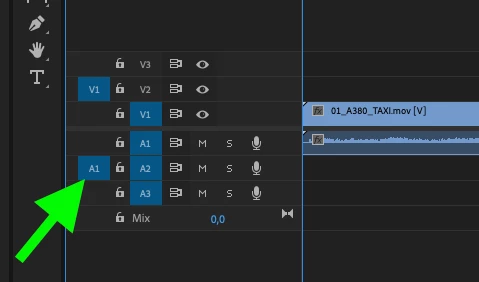
Check if you have the Source Patching for Inserts and Overrides button active on the corresponding Track. Also, you still haven't given us details of the clip you're using like which container and which codec. Even if you transferred the clips from a camera, you could give us details of how you ingested the footage.


2 replies

Byron CortezCommunity ExpertCorrect answer
Community Expert
June 12, 2021

Check if you have the Source Patching for Inserts and Overrides button active on the corresponding Track. Also, you still haven't given us details of the clip you're using like which container and which codec. Even if you transferred the clips from a camera, you could give us details of how you ingested the footage.


Byron.
Participant
October 27, 2023

Thank you so much that worked for me!!!!