Participant
January 25, 2021
Question

Opacity masks not following the lines I draw

  • January 25, 2021
  • 1 reply
  • 327 views

I'm trying to draw opacity masks to ransition between scenes. I've come to an issue where the mask is not following the draw lines, instead sitting off to the side. 

My monitor scaling is on 100%, I'm running Windows 10 Pro with an RTX 3060Ti and Ryzen 9 3900x. relativelty fresh intall of premiere with no plugins.


Here is a picture of the issue-
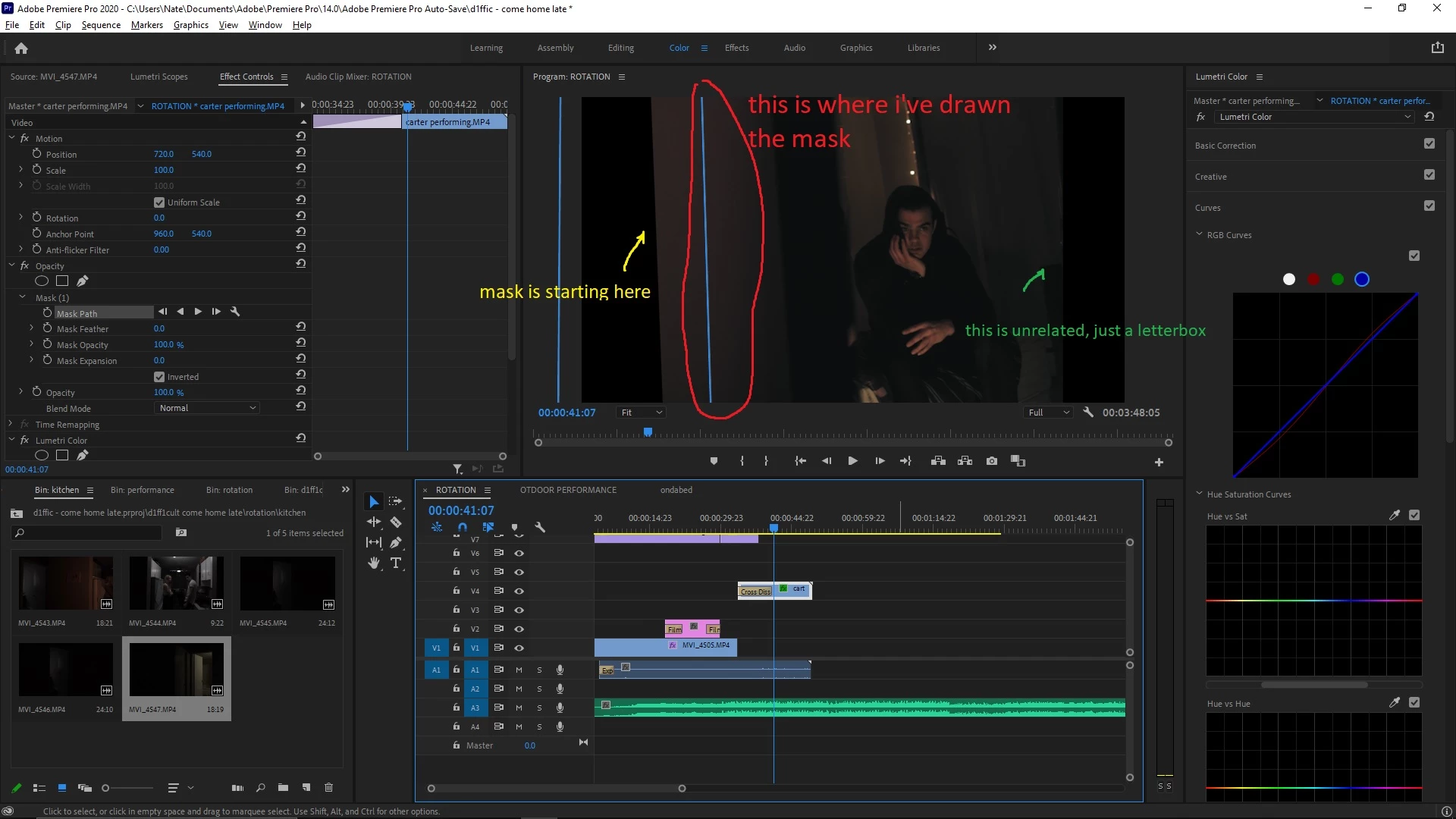


Did I change something in error? is there a fix for this?

This topic has been closed for replies.

1 reply

Kevin J. Monahan Jr.
Legend
January 25, 2021

Nate,

Sorry. Try this: Nest the clip, then draw the mask. If that works, then we'll know more. Let us know the results.


Thanks,
Kevin

Kevin Monahan - Sr. Community and Engagement Strategist – Adobe Pro Video and Audio
Nate5E95Author
Participant
January 25, 2021

Thanks Kevin, That actually worked! the mask is lined up properly now and is moving as keyframed