Participant
September 20, 2019
Question

Open captions crashes Premiere Pro CC

  • September 20, 2019
  • 6 replies
  • 3746 views

Hello!
Everytime when I need to add open captions to a video and edit their timing, Premiere Pro CC crashes.
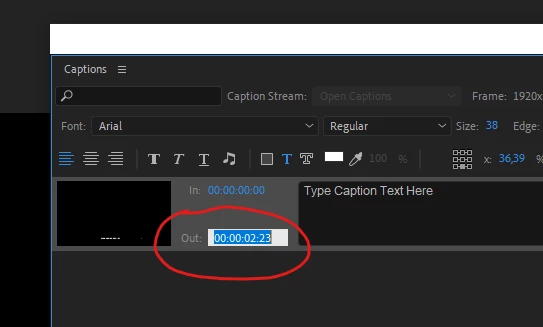
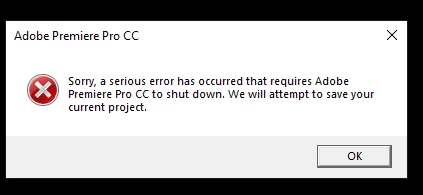
I have noticed, that it only happens when I copy captions from a word document, paste them in "TYPE CAPTION TEXT HERE" field, then press on IN: numbers, to set them to start at specific timing, and just as I press on the OUT: numbers, Premiere Pro CC crashes giving me error: Sorry, a serious error has occured that requires Adobe Premiere Pro CC.
I can move caption start and end point in the timeline and it does not crash, but that takes too much time, if I know precise timing of when they should start and end.
Any ideas? Because if this adding open captions is taking forever.

I am on latest Windows 10, with latest Premiere Pro CC version, i7-8700K CPU @ 3,70GHz, Nvidia Quadro P2000, 16GB of ram and 240 GB SSD.

    This topic has been closed for replies.

    6 replies

    Stan Jones
    Community Expert
    Community Expert
    December 29, 2020

    This is an old thread, and we didn't hear back from Ivo. What specific version of PR are you running? The latest is 14.7.0.


    How are you pasting? Source? Method?


    Thanks,


    Stan

    Tiny Film
    Participant
    December 28, 2020

    hi there,

    I experience the same problem: premiere crashes, when I am copying in or out numbers. And I am not copying from word... Did you figure it out?

    Stan Jones
    Community Expert
    Community Expert
    September 23, 2019

    Let us know what you try and what works!

    Participant
    September 23, 2019

    Thank you both!
    I will try pasting to notepad at first. If it will still keep crashing, I will try your mentioned captioning programs!

    Stan Jones
    Community Expert
    Community Expert
    September 20, 2019

    Word can put invisible, problematic characters in. So always paste to a text document (notepad) first.

    However, I just tried this, and I do not have this issue. But I would simply try that first. What you are doing should work.

    Generally, I do not find PR a good caption editor. If you already have the text and timings, I'd create an srt and import that. I like SubtitleEdit, a free app.

    PR updated a few days ago to 2019.1.5. What version do you have? It should not matter; I don't think anything has changed in the last few updates for the simple task you are doing.


    Legend
    September 20, 2019

    Premiere's captioning tools are a waste of time. Rather than fight them, just render out a quick copy of your timeline and use a proper captioning program to generate your data files. Much faster to use, a full set of tools and no crashing. Aegisub ( http://www.aegisub.org/ ) is free and cross-platform, it's pretty much the standard tool for people who don't want to drop $20,000 on a Telestream license.