Participant
November 7, 2017
Answered

Opening Multiple Projects Bin Behaviors

  • November 7, 2017
  • 1 reply
  • 998 views

I know you can change bin behaviors in preferences, but I'm having a problem I'm not sure how to solve. Just updated to CC2018, and when I open an additional project the bin pops up on my other monitor, and it's slightly off the screen. In fact, even when I double click on a bin to open it in a new window it does the same thing. I haven't seen any preferences to change this behavior. I've tried switching workspaces, but it still does the same thing. Is there a way to reset this so that when I open another project, it opens up in a panel, rather than as a floating panel?
    This topic has been closed for replies.
    Correct answer kulpreet singh

    Hi Kevinalexander9898,

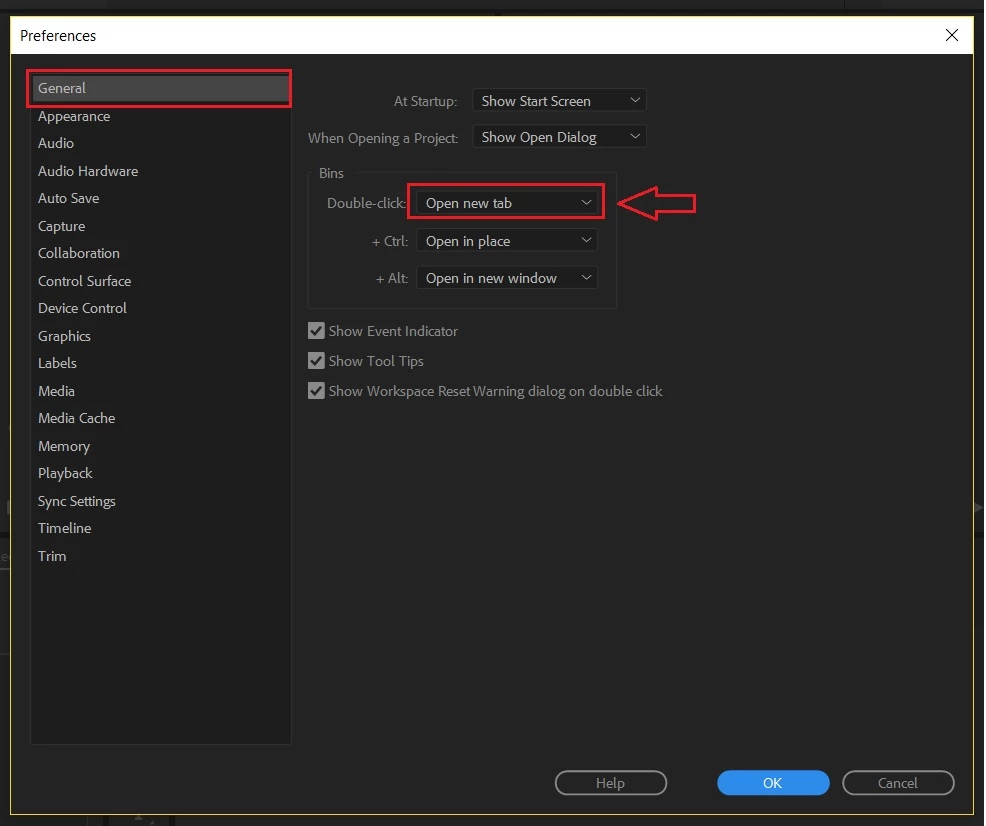
    Please change the Double-Click behavior to Open new tab in the Preferences.

    Let me know if that helps.

    Thanks,

    Kulpreet Singh

    1 reply

    kulpreet singh
    kulpreet singhCorrect answer
    Inspiring
    November 7, 2017

    Hi Kevinalexander9898,

    Please change the Double-Click behavior to Open new tab in the Preferences.

    Let me know if that helps.

    Thanks,

    Kulpreet Singh

    Participant
    November 7, 2017

    Yes, that did it. Thank you!

    kulpreet singh
    Inspiring
    November 7, 2017

    Thanks for confirming.

    Good Luck!