Participant
June 12, 2025
Answered

OpenTimelineIO (OTIO) Export Option Missing in Premiere Pro's Export Menu

  • June 12, 2025
  • 1 reply
  • 402 views

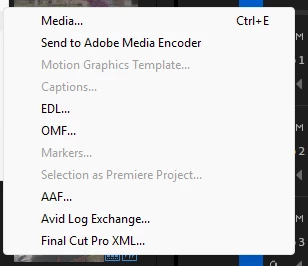
The OpenTimelineIO (.otio) export option does not appear in Premiere Pro's File > Export menu, despite successful installation. Only standard formats (EDL, OMF, AAF, XML, etc.) are listed. OTIO is completely missing. 


Correct answer jamieclarke

Hi @Maria Fernanda MB - This feature is still in beta. To try it out, please download the latest Beta version from the Creative Cloud desktop app.

To stay up to date, check out this article: OTIO Import and Export.

1 reply

jamieclarke
Community Manager
jamieclarkeCommunity ManagerCorrect answer
Community Manager
June 12, 2025

Hi @Maria Fernanda MB - This feature is still in beta. To try it out, please download the latest Beta version from the Creative Cloud desktop app.

To stay up to date, check out this article: OTIO Import and Export.

Participant
September 2, 2025

Sorry, Flame, AVID, Nuke, Blender, DaVinci work in there real Versions with OpenTimeline.

Wy shoud i work with a beta. In the Premiere beta is OpenTimeline over 2 years,

now is the time, to work with real Premiere Pro with OTIO!