
Out of sync clips
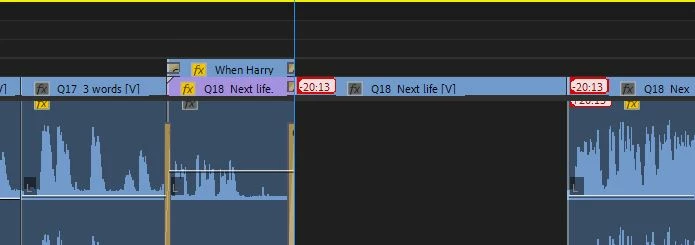
Hello, I would like to ask for help. The weirdest thing happened to me while I was working on my last project this past week. My every action on the timeline, no matter how mundane, like ripple delete or insert, caused the subsequent clips out of sync. I can tell you this is very annoying and cost me lots of time to redo my project.
I've googled for the solution or at least the explanation, and I found that one person had the same issues, and the advice was that Premiere does that when the timeline is very zoomed out. It's hard to say what will be the safe amount of zooming. I did have the timeline zoomed out to almost the limit. I followed this advice, very cautiously proceeded with my project, didn’t use the ripple delete, and finished it.
I have a hard time believing that it’s a program glitch. Especially, since I’ve used the program just two months earlier without any problems. I would appreciate any useful insight.
Thank you in advance and I'm hoping that the collective expertise of the group will help me solve the issue.
I'm attaching an image as how the clips look like after I executed the ripple delete command.


 AdChoices