


jeffk29977584
Participant
March 28, 2022
Question

Panel Keyboard shortcut not overridden when on Program Panel.

  • March 28, 2022
  • 5 replies
  • 357 views

Hello, 

I programmed my Up/Down arrows to zoom in and out of the timeline.  This works fine when in the timeline window.  Sometimes I am working in the Program panel, and I play, and wnat to zoom in on the timeline and it jumps to next edit in timeline, even though I have disabled all other assignments for the Up/Down key (except nudging in titles) See pict.  How can I not have this happen? If you are going to say just use crtl-plus to zoom, just don't reply.  Thanks!
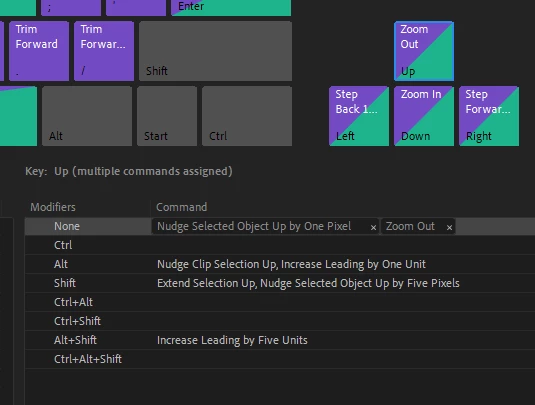
 

This topic has been closed for replies.

5 replies

Jeff Bellune
Legend
March 28, 2022

It's not clear from your screenshot what you have assigned for the up/down arrows for the Go To Next/Previous Edit Point under the Application shortcuts group.


That's what Pr is doing when you're not in the Timeline panel; it's using whatever is set in the Application shortcuts group.

jeffk29977584
Participant
March 28, 2022

In the Application shortcut group, I have Go To Next/Previous Edit Point assigned to A and S. 


Jeff Bellune
Legend
March 28, 2022

Then I have no idea what is going on, sadly.

To start troubleshooting, I recommend saving your current setup as a keyboard shortcut preset if you haven't done it already.

Then go back to the default preset and change only the up/down shortcuts, and the next/previous edit shortcuts. Save that as a "test" preset and see if things work as expected for you.