January 24, 2026
Answered

Pen Tool disappeared from both Lumetri and Opacity in the effects panel

  • January 24, 2026
  • 1 reply
  • 108 views

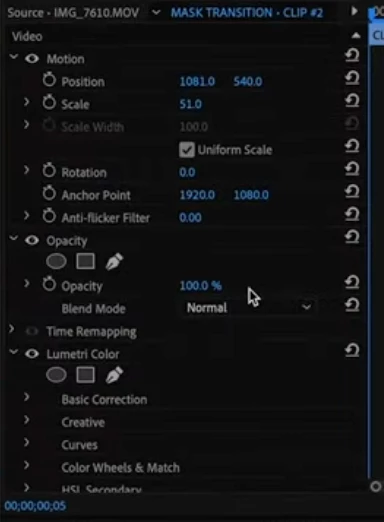
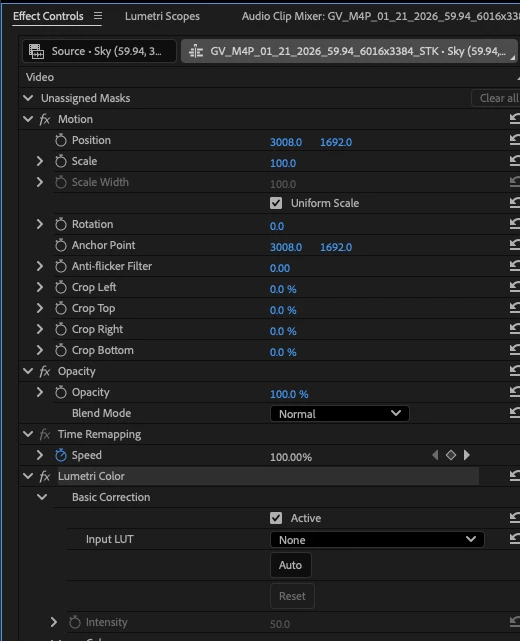
I am unable to locate the pen tool in the effects panel. I can't locate the pen tool for Lumetri or Opacity. 


Usually the pen icon can be found at the top of each sub-panel but I don't see it. Am I mising something?


"All Panels" view is enabled. This is the first time experiencing this issue and it only began after updating to the latest version, 26.0.0 (Build 72).


Attached is a screenshot of my current view in Premiere Pro, then the second attachment is what it used to look like.


Thanks
 

Correct answer kes_akalaonu

The new vector mask tools replaces the system that was in 2025. Now you can find the square, circle and pen mask tool when you long press the Object Mask tool in the toolbar.


These HelpX articles should get you up to speed on how to utilize the new masking tools:

https://helpx.adobe.com/premiere/desktop/add-video-effects/create-masks-and-composites/adjust-masks-at-the-clip-or-frame-level.html

https://helpx.adobe.com/premiere/desktop/add-video-effects/create-masks-and-composites/rectangle-ellipse-and-pen-masks.html


1 reply

kes_akalaonuCorrect answer
Adobe Employee
January 25, 2026

The new vector mask tools replaces the system that was in 2025. Now you can find the square, circle and pen mask tool when you long press the Object Mask tool in the toolbar.


These HelpX articles should get you up to speed on how to utilize the new masking tools:

https://helpx.adobe.com/premiere/desktop/add-video-effects/create-masks-and-composites/adjust-masks-at-the-clip-or-frame-level.html

https://helpx.adobe.com/premiere/desktop/add-video-effects/create-masks-and-composites/rectangle-ellipse-and-pen-masks.html


January 25, 2026

got it. great, thank you very much