


mikecox_
Inspiring
December 11, 2025
Answered

Pen tools appears to be inactive; no shapes listed

  • December 11, 2025
  • 2 replies
  • 505 views

When I press "P" i can draw the outline of a box, but it disappears when I release the mouse button. 

Plus, I don't see the Pen tool options listed under Opacity.
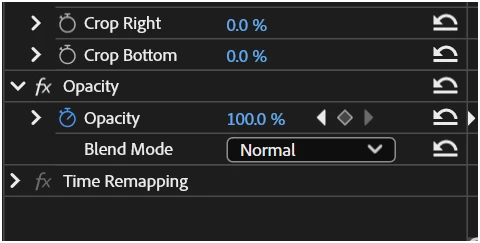
869143iB40A27ED62E143A2.png


Correct answer Ann Bens

As you are on the beta the masking feature has been completely overhauled.

Use object masking in Premiere Pro


Might want to update the beta to a more recent build.

2 replies

MarekMularczyk
Community Expert
Community Expert
December 12, 2025

Are you trying to draw a shape with the actual Pen tool or create an Opacity mask with the pen mask creation tool?


Adobe Community ExpertAdobe Certified Professional
mikecox_
mikecox_Author
Inspiring
December 12, 2025

I'm familiar with the pen tool, I've used it often, in masking projects, but I'm not seeing it Under opacity. "P" activeates it but the shape doesn't take.


I'm trying to do is create a Tracking mask.


869322iEFC4081CA05B0D81.png


Using Win 11
Ann Bens
Community Expert
Ann BensCommunity ExpertCorrect answer
Community Expert
December 12, 2025

As you are on the beta the masking feature has been completely overhauled.

Use object masking in Premiere Pro


Might want to update the beta to a more recent build.

Ann Bens
Community Expert
Community Expert
December 11, 2025

Which Premiere version is this?
If it's 2025.x then you might need to trash preferences.

mikecox_
mikecox_Author
Inspiring
December 12, 2025

869317iEF9EE38280B7FE4B.png


What do you mean "Traxh Preferences?"

Using Win 11

