
Participant
May 6, 2011
Answered

Pink/green line on edge of screen during cross-dissolve transitions to and from black

  • May 6, 2011
  • 15 replies
  • 34984 views

I've seen this posted as a known bug in Premiere, but I haven't found a decent solution to it.  Here's a screen cap of what it looks like:
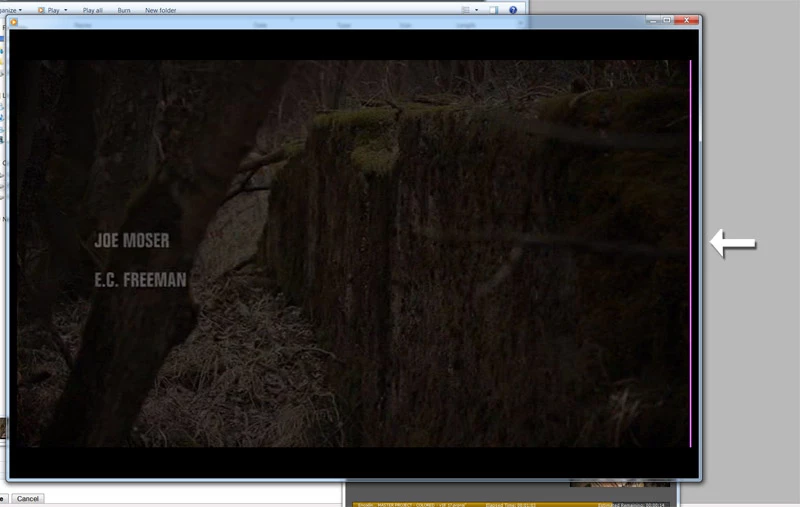
Notice the pink verticle line on the right side of the frame. This happens when I'm exporting it out of the timeline to another format - it doesn't look like this in the timeline. I have done a few tests and it seems to only do this when:

A) it's fading from black or to black - cross-dissolving from one video to another doesn't do it

and

B) the output video is in widescreen 16:9

It doesn't happen when I'm creating an HD video and it doesn't happen when it's an SD video in "D1/DV NTSC (0.9091)" aspect.

Thoughts?

    Correct answer

    I should point out a couple of things here:

    • In my experience, I don't have a CUDA card, so I assume I'm using Mercury Playback Engine. However, I seem to always get a pink line if I use Adobe Media Encoder. If I just export directly from Premiere, I don't get it.
    • All of my sequences are exported at 1280x720 or 856x480, both of which are divisable by 4.

    Given these two points, I'm inclined to say the problem is with AME and it needs to be solved by Adobe. Using opacity instead of transitions is just silly - we've been using transitions in digital editing packages for years, so this shouldn't cause pink pixels.

    15 replies

    Ann Bens
    Community Expert
    Community Expert
    July 14, 2011

    I have seen this before also, you can file a bugreport if you like.

    https://www.adobe.com/cfusion/mmform/index.cfm?name=wishform

    Participant
    July 14, 2011

    I just fixed the problem by altering the resized dimensions.

    My dimensions used to be 460 by 258 and my original footage is 1920 by 1080.  The reduction factor to get from 1920 to 460 is 4.1739, which would make the height actually 258.75 pixels.

    So I decided to try a reduction factor of 4, which gets me a reduced size of 480 by 270.

    Using these dimensions, everything renders fine with no pink lines on the right.

    Participant
    July 30, 2023

    Just had that problem today, and this was exactly the solution, thank you! My original footage was 1920x1080, but I had reduced the aspect ratio after cropping.

    Participant
    July 14, 2011

    I have the same problem.  Pink line (4 pixels wide).

    I'm also using widescreen HD footage and resizing it down.  In my case to 460 by 258.

    All looks fine during preview, but the final render comes out with a 4 pixels wide line pink lines on the right side during transitions.

    My background is white, so it can blend in to the web page where I'm placing the video, and I have a white matte as my video 1 layer.  I tried scaling the matte to 120% of the video's size, but that made no difference.

    Anyone got any ideas?

    Participating Frequently
    May 6, 2011

    Haven't had that exact problem with pink line, but have solved similar problems by making sure I put a few seconds of black video on the front and back ends of my media timeline work area before exporting. 

    Legend
    May 6, 2011

    I do widescreen DV all the time and have never seen this.  Can't think of anything off hand that could be a cause.