
Inspiring
October 29, 2022
Answered

Pixel 7 Pro Footage HDR 10 Bits

  • October 29, 2022
  • 5 replies
  • 10839 views

Hello Guys,

How can I deal with Pixel 7 Pro footage on Premiere Pro? Currently, my version is 23.0
 

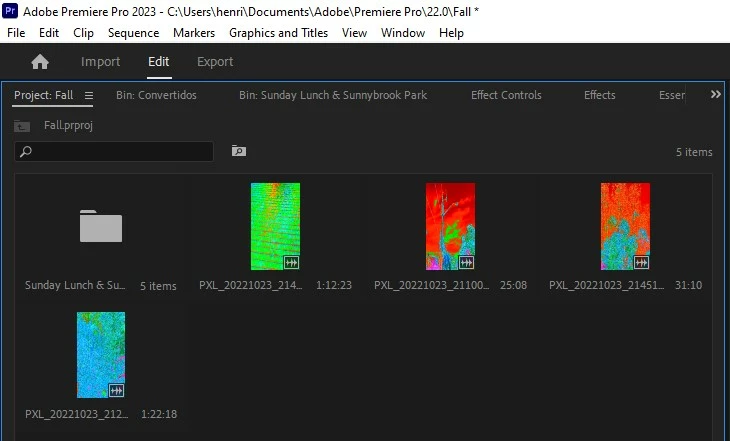
When I import my footage video like is not supported by Adobe. I mean, is it serious? Adobe doesn't support HDR 10 Bit? If not, Media Encoder 2023 can help by converting this to a support file for Premiere so I can work with it. Handbrake, so far, got my footage washed out. I feel powerless in this situation! Looks like there is nothing that I can do. How does Adobe not support it? HDR 10 Bits has been around for a while now.
Correct answer R Neil Haugen

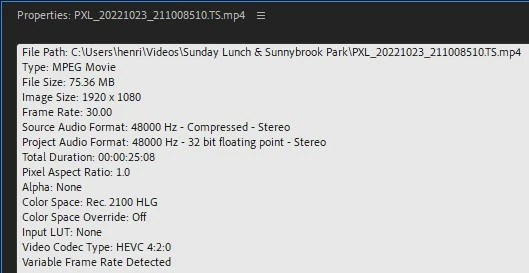
That phone footage is HLG, and also VFR ... variable frame rate. Pr is not great at working with VFR footage, as that means the number of frames per second constantly changes yet the audio stays constant. Pr is built as any NLE for constant number of frames per second.


So yes, converting that to CFR would probably be wise before importing to Pr. You might try ShutterEncoder, also free, also based on ffmpeg ... but with a more 'modern' UI than Handbrake.


Next, make sure you are using the latest video drivers for your card. And if Nvidia, that you are using Studio drivers and not 'game-ready' drivers. I've seen a couple posts where people had the same view as you post which gee, was fixed as soon as they changed to studio drivers.


And in most apps, if you are going to work with HDR footage, you need to do some manual color management work.


Neil

5 replies

Inspiring
January 8, 2023

Yah...it's a mess working with these files "mobile" files.

The Google Pixel 7 creates 10 bit HDR files in VFR strangely, not in CFR of 29.97.

Same with Samsung and iPhone HDR videos...

Since frames rate is varying and sound is constant PP struggles with that.

It's an NLE meant to work with professional files, not those unregulated wild west "mobile" formats.


The smartphones HDR files are far from "professional" format.


They kinda' cheat, take one high exposure frame, one low exposure frame, and blend it real quick without killing the small 5000mAh battery...


These tiny encoders have nothing to do with what you'll find in an ARRI, RED or LUMIX...


HERE'S THE FIX:

(Until Adobe adds more exotic "mobile" codec support)


1. Feel the pain from those messy false-color-like images... Scream, yell, rant.

What a mess... Why did they have to do you like this!?

1000$+ smartphone and 100$/m software suite. Million-dollar marketing campaigns!

And you still face the fact that money can't buy happiness.

But it's okay... Life goes on, and we'll find a solution.


2. ⚠️ RENAME the 10-bit HDR files to .MPG instead of .MP4 or .MOV.

That'll force PP to interpret frame by frame instead of looking for Long GOP keyframes.


3. Do a Color Space Override. Change files interpretation to REC. 2020 from HLG.

You might as well, adjust frame rate to something more legal.

What the heck is 30.0062fps??? Clock it to 29.97fps.


Warning: watch your sound afterward for any audio drifts. If any.


4. Adjust Exposure and white levels to taste using Lumetri or any curve tools.


5. Sit back relax, grab a coffee and keep doing great work using normal-looking footages.


Enjoy! 🤓


Legend
October 29, 2022

To be honest, everything is sad with Adobe codec support. Now, more and more people are using third-party applications to record from screens to confirm their actions (regardless of the game or sites with programs) and Premiere does not support.MKV is a more modern codec than .MP4. Engineers have removed its support. The same trend has been with HEVC lately. Some files open, some don't. Files with the extension .I don't remember MTS with the index, it's also a problem, but not with everyone. The video opens, but with the music question. Users should not experience problems with codec support in the professional installation program provided. Than then this program benefits from simpler and undemanding programs for video cropping. There are no codecs there either. And what is the strength? Very weak support for more modern readable extensions.

R Neil Haugen
Legend
October 30, 2022

Premiere's codec support seems to be rather broader than the other two major NLEs ... Resolve and Avid. Resolve doesn't do ProRes RAW at all ... and Avid doesn't do a fair number of codecs well or at all.


Yes, Pr doesn't support Matroska, which isn't normally used in any b-cast/streaming or even any web-bound work. Would it be nice if they did? Yea. Would it be nice if Resolve could work with ProRes RAW? Oh Hades, yes.


Neil

Everyone's mileage always varies ...
Legend
October 30, 2022

.MKV (Matroska) was supported up to version 15 of Pr, if I'm not mistaken. And there was also more extensive support for audio files. But then they refused. It seems that people only work with not very good in quality and performance .H264

chrisw44157881
Inspiring
October 29, 2022

from the screenshots, it looks like it can't decode correctly. try free shutter encoder convert prores and see if that fixes the issue.

R Neil Haugen
R Neil HaugenCorrect answer
Legend
October 29, 2022

That phone footage is HLG, and also VFR ... variable frame rate. Pr is not great at working with VFR footage, as that means the number of frames per second constantly changes yet the audio stays constant. Pr is built as any NLE for constant number of frames per second.


So yes, converting that to CFR would probably be wise before importing to Pr. You might try ShutterEncoder, also free, also based on ffmpeg ... but with a more 'modern' UI than Handbrake.


Next, make sure you are using the latest video drivers for your card. And if Nvidia, that you are using Studio drivers and not 'game-ready' drivers. I've seen a couple posts where people had the same view as you post which gee, was fixed as soon as they changed to studio drivers.


And in most apps, if you are going to work with HDR footage, you need to do some manual color management work.


Neil

Everyone's mileage always varies ...
MineiranAuthor
Inspiring
October 29, 2022

Thanks a lot for your reply. It's kinda frustrating in those situations!

Community Expert
October 29, 2022