

MeKevinB
Known Participant
August 24, 2025
Question

Playhead Snapping Randomly Disabling

  • August 24, 2025
  • 3 replies
  • 223 views

It's August 24, 2025. I updated Premiere to version 25.4.0 Build 99 a few days ago. This install is on an M1 iMac running macOS Sequoia 15.6.1 on 16GB of RAM.
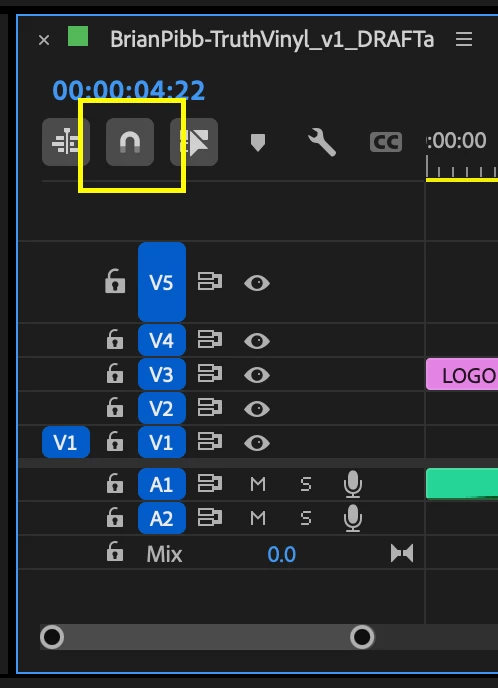


This is not user error because I never want it disabled but the playhead snapping option in the timeline is randomly disabling while working in any project, not just one specific project. I haven't been able to nail down an exact trigger so I'm calling it random for now. I will always find it puzzling how updates always, always, always break things that have worked for years. I'm not a software developer but active beta testing should catch stuff like this, right?

3 replies

Community Expert
August 25, 2025

It's very easy to toggle - untoggle the snapping by pressing "s" by mistake, it happens with me all the time...

Ishan Y
Inspiring
August 25, 2025

Hey Kevin,

I'm sorry to hear about this. As a test, please go to Premiere Pro > Keyboard Shortcuts (Command + Option + K) and search for "Snap in Timeline". Unassign the keyboard shortcut or change it to something with a modifier key. Save the changes and let me know if you're still experiencing the issue.


Thanks,

Ishan

Please tag me (@) in your replies so that it notifies me and helps me respond promptly.
JonesVid
Community Expert
Community Expert
August 24, 2025

The Playhead 'Snap' option is a tick box in Preferences set up - Prefs/Timeline

I'm just wondering if your Preferences file has some random corruption ?....

Occasionally after a Premiere update I have had to reset preferences. I'm working in Windows not on a Mac.

You could try reseting them - but don't forget you will have to enter all your personal preference setup selection again.

Its worth a try.

https://helpx.adobe.com/premiere/desktop/troubleshooting/preferences-and-settings-issues/reset-preferences-at-launch.html


MeKevinB
MeKevinBAuthor
Known Participant
August 24, 2025

Thank you, JonesVid, for the response. I checked my Timeline preferences and, unfortunately, my setting was intact on first glance. It's the toggle in the timeline user interface that I highlighted in my screenshot that keeps getting randomly disabled. It is HIGHLY frustrating and I can't imagine others aren't seeing it too. Today alone, it has happened dozens of times. If I using Premiere Pro as a newbie, this would be a deal breaker and I would be on a trial version of Resolve. This is a crazy bug.

Community Expert
August 24, 2025

Would you be willing to try a preference reset as indicated? That would at least eliminate corrupted prefs as a suspect. You can always save a compy of your prefs file and replace it if the reset doesn't work.

-------------------------------------------------------------------------JVK | Editor/Designer/Software Instructor. Pr, Ae, Ch, Ps, Ai, Id