'Playing assets' documentation is in pretty poor shape
Playing and previewing assets in Premiere Pro
If you click the link above, the documentation describes a "shuttle slider" and a "jog disk". Am I missing something or do neither of these actually exist? The image labels seems to point to the playhead, and the scrollbar, and not the "shuttle and jog controls" as mentioned there.
The image itself is squished and not in its original 1:1 aspect ratio. Not a great look for the company that literally makes Photoshop.
I believe Premiere CS6 had a jog wheel, so perhaps the documentation is referring to that.
Furthermore, in the section a bit further below, titled "Using the J, K, and L keys to shuttle video", this line is wrong:
"The J key always moves the playhead in reverse and the L key always moves it forward."
This isn't true, because if you're playing forward at 2x, then J will reduce the speed back to 1x, and not move the playhead in reverse. Vice-versa for L.
Also, the video it links to to show the controls in practice, takes you to a 3rd party website, runs on Flash (no, really), and shows Premiere CS6 in all its glory, and also has outdated information in it, for e.g. "Press Page Up/Down to go to the previous/next edit point". Probably want to update that video, or just remove the link altogether.
Also, in the same section, in the big "Note" box, there is more wrong information:
"If you are playing back too quickly, press the opposite keyboard shortcut to slow playback. For example, if you were playing back too quickly forward, press Shift+J to slow playback down by one increment."
Again, this is wrong, because using the above example, Shift+J will slow playback down by 1/10th of an increment, and J will slow it down by one increment.
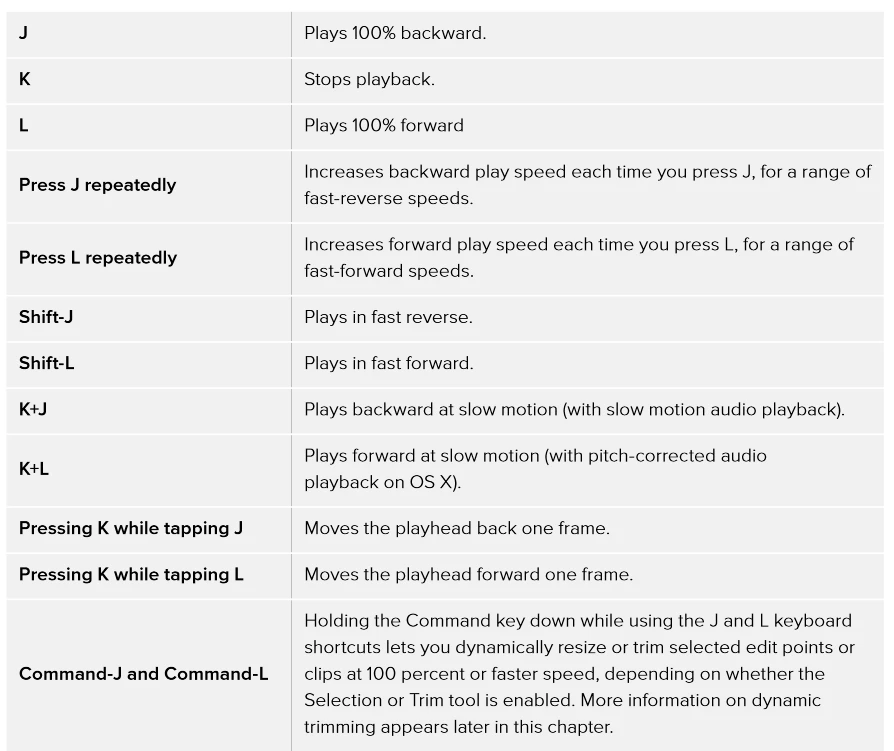
Finally, as a general note, that page has a ton of useful information on efficient navigation, but is presented really poorly by using paragraph form that is difficult to digest and read through. The whole page could greatly benefit by rewriting all the shortcuts into an easy-to-read table form.
Here is a screenshot from DaVinci Resolve's manual for an example of what well-written documentation looks like:
 AdChoices