
Chris-AndrewGrantLLP
Inspiring
December 1, 2016
Answered

Playstation 4 Clips Audio Cut

  • December 1, 2016
  • 4 replies
  • 1496 views

   Hi All,

I've recently started collecting clips on my Playstation 4 for editing.
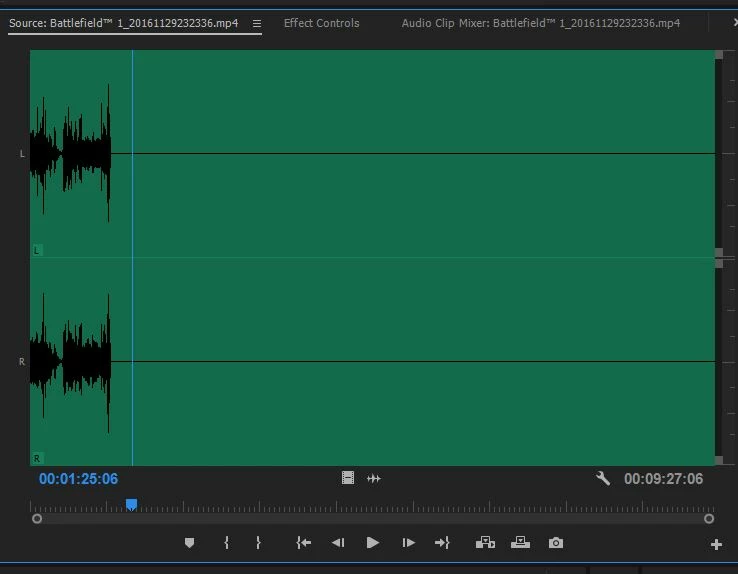
Now the issue is when I import said clips into Premiere, if it is a full 10-minute video the audio will cut out after a certain time. (image attached)

Now this issue does not happen if I trim the clip in the PS4 Gallery (however, quality is severely reduced)

Is there a way to fix it without converting it? The clip plays fine in all media players with no loss of sound.
Correct answer Vidya Sagar

Hi Chris-AndrewGrantLLP,

Clear the Media Cache & try importing the files again into Premiere Pro.

Instructions:FAQ: How to clean media cache files .

If issue persists, we need to transcode the files using Handbrake to Mp4 & import into Premiere Pro.

To my knowledge, handbrake transcode may not reduce the quality.

https://handbrake.fr/

Please let us know the status.

Thanks,

Vidya Sagar.

4 replies

Participant
September 6, 2025

This happens a lot with PS4 recordings — Premiere doesn’t like how the audio is encoded on longer clips. Easiest fix is to just rewrap the file (not convert) using something like Shutter Encoder or FFmpeg. Quality stays the same and Premiere will read the audio fine.

Participant
September 5, 2025

Hi Sounds like you’re running into an audio sync/codec issue that sometimes happens with long PS4 clips in Premiere. Even though the file plays fine in media players, Premiere can struggle with certain codecs or container settings. Trimming works because it essentially re-encodes a shorter portion, which Premiere handles better.

A workaround is to use a free, lossless editor or converter that preserves quality while fixing the audio timeline, or split the clips into smaller segments before importing.

On a related note, if anyone is also into retro gaming or emulation, I run a site with step-by-step PS2 emulation and BIOS setup guides that make older games run smoothly:Check this out

Participant
September 4, 2025

Hi there,

This issue is pretty common with PS4 recordings because the console saves clips in a variable frame rate (VFR). Premiere often struggles with long VFR clips, which is why the audio cuts out. Trimming in the PS4 gallery works because it re-encodes the clip, but as you noticed, that reduces quality.

A better fix is to convert the file to a constant frame rate (CFR) using a tool like HandBrake. That way, Premiere will read the audio properly without losing quality.

Hope that points you in the right direction!

Ann Bens
Community Expert
Community Expert
December 1, 2016

When importing clips you need to let it conform completely before doing anything.

Chris-AndrewGrantLLP
Inspiring
December 1, 2016

Hi Ann,

I do let them conform, I even leave them for several minutes. I will try with another clip now to confirm.

*EDIT*

Just let it conform completely before selecting it.

Same issue.

Vidya Sagar
Adobe Employee
Vidya SagarCorrect answer
Adobe Employee
December 1, 2016

Hi Chris-AndrewGrantLLP,

Clear the Media Cache & try importing the files again into Premiere Pro.

Instructions:FAQ: How to clean media cache files .

If issue persists, we need to transcode the files using Handbrake to Mp4 & import into Premiere Pro.

To my knowledge, handbrake transcode may not reduce the quality.

https://handbrake.fr/

Please let us know the status.

Thanks,

Vidya Sagar.