July 12, 2020
Answered

Please Help Me With Using Adjustment Layers???

  • July 12, 2020
  • 2 replies
  • 586 views

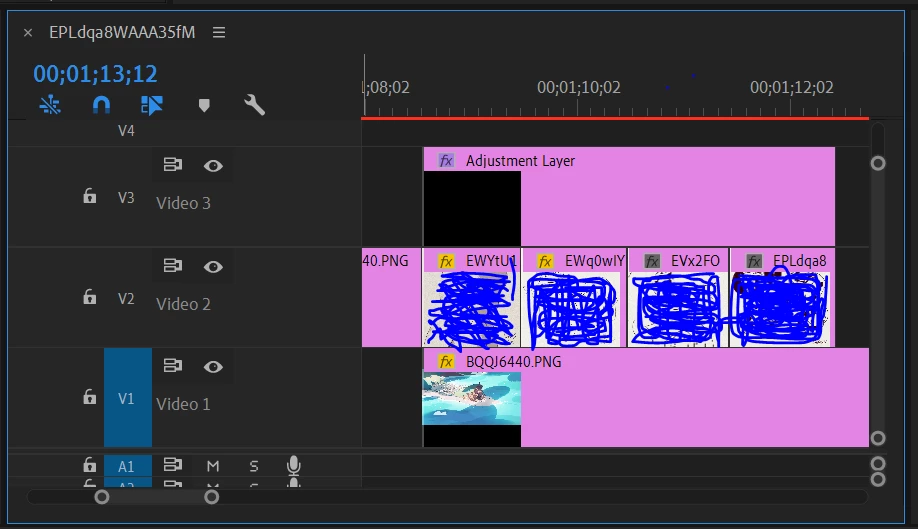
Hello! I need some help with adjustment layers in Adobe Premiere Pro 2020? So, what I'm trying to do is make an animation pan and zoom across a still background. In order to do this, I figured I could import and assemble all of my frames (png files, no background) in Adobe Premiere Pro, and then use an adjustment layer to pan and zoom the animation while the background stays still. Now, this worked, but turns out it would move the background also? How do I make it to where the adjustment layer only affects the clips right below it and leave my background alone? I figured I could try this instead of having a blue or green background behind my animation frames (doing this makes the quality of my drawings dip). If there's a solution to my problem in either Photoshop 2020 or After Effects 2020, I'd be glad to hear it!
This topic has been closed for replies.
Correct answer Joëlle Bh

Make all your animations using adjustment layers on a sequence with no background. Nest that sequence then drop a background under the nested

2 replies

gerikp
Community Expert
Community Expert
July 12, 2020

Adjustment Layers affect every video track below it.

Joëlle Bh
Community Expert
Community Expert
July 12, 2020

exactly, but when a sequence with an adjustment layer is nested,dropping a background under the nested sequence will not make that background affected by the adjustment layer which exists in the nested sequence

Joëlle Bh
Community Expert
Joëlle BhCommunity ExpertCorrect answer
Community Expert
July 12, 2020

Make all your animations using adjustment layers on a sequence with no background. Nest that sequence then drop a background under the nested

July 19, 2020

Oh, you are a godsend, thank you so much, it worked!!!